Monday, 31 August 2020

Brand Voice – Everything You Need to Know

This article has been contributed by Abhishek Talreja.

Stay true to your values. Thats why you were a success in the first place, and thats how you make incredible things happen. Rafe Offer

Publishing and promoting unicorn content isn’t about the consistency of the process alone. A key element of successful content marketing is the brand voice.

A content marketing voice is a key distinguishing factor that makes branded content stand out from the competition. But let’s first understand the meaning and importance of brand voice.

What is a Brand Voice?

Every time they see your brand message, a brand voice evokes a specific emotion among the audience. It creates a single impression in terms of emotion and personality.

  1. A brand voice comes across as an expression of the people behind the company. In a way, it tells their story.
  2. A unique brand voice distinguishes your business in a crowd of competitors. It creates a distinct culture and taste — something a specific audience can recognize and relate with.
  3. A unique voice builds trust with prospects and customers.
  4. A focused brand voice helps to evoke strong feelings among buyers and encourages them to make a purchase decision.

Why is it Essential to Align Content Marketing with Brand Voice?

According to a new report by media agency Havas, 60% of the content created by the worlds leading 1,500 brands is just clutter that has little impact on consumers lives or business results.

In today’s time, when the internet is full of me-too content, you don’t want your content efforts to get lost in the crowd.

However, most successful brands and companies realize the importance of powerful branding. They work hard to invest in building a robust brand personality.

Repetitive brand messages become a promise to create a certain level of tangible and emotional fulfillment. A strong brand character plays a huge role in fetching recurring new business.

On the other hand, if you did not have a distinct content marketing voice, your content could feel incomplete — stuff with the following symptoms:

  1. Disconnected website messaging
  2. Messy and distorted content
  3. Inconsistent writing and visuals
  4. Grammatical and language errors

With a unique voice, branded content evolves as an entity that creates recall as well as audience loyalty. It’s through a consistent tone and voice that you can produce authority content –  an essential part of a winning content strategy.

How To Integrate a Strong Brand Voice Into Your Content Strategy

Take the following steps to infuse a strong brand voice in your branded content marketing efforts:

1. Discover Your Brand Purpose

Every business exists for a larger purpose. A business owner starts with a seed idea — a plan to bring about change in the lives of one or many groups of people. It is how you build a relationship with prospects and customers.

A brand purpose is beyond numbers such as revenue and profit — it works as a motivation to continue doing the business even when the waters aren’t as easy. In this video, Simon Sinek explains the importance of exploring the ‘Why’ of your business. An intelligent audience can quickly figure out if your intentions aren’t authentic, and you don’t want that to happen.

An understanding of the ‘Why’ is about going back to your vision, mission and core values. It’s about exploring your roots.

In the process of discovering your brand story, here are some questions you need to ask:

  1. What are the significant gaps in your industry?
  2. What is it that you’re offering and how is it different from others in your niche?
  3. How are your products and services, changing the lives of your customers?
  4. What are some of the values that you feel strongly about?
  5. What are the emotional benefits of your products and services?
  6. Why would customers love your brand?

Answering these questions help you to create a brand purpose statement. A unique story lays the foundation to start building a brand voice.

2. Find Your Brand Archetype

An archetype or a persona helps to understand a brand at a deeper level. Carl Jung, the famous Swiss Psychologist, identified 12 classic brand archetypes or personas.

These personas match human personality types: The Innocent, The Everyman, Hero, The Outlaw, The Explorer, The Creator, The Ruler, The Magician, The Lover, The Caregiver, The Jester and The Sage.

Similar to humans, a brand personality and voice are intertwined—each personality has a natural voice and style. Most existing brands fall under one or more of these brand archetypes. Take a look at some of these examples:

  • The Hero: Nike, BMW, Duracell
  • The Explorer: Jeep, Red Bull REI

The following visual shows how some famous brands fall into a distinct brand archetype:

Brand archetypes and brand examples

Here are some steps to find your brand archetype:

  1. Know your personality as a business owner.
  2. Make a list of your brand’s core emotional values.
  3. Pick up a primary and a secondary archetype that goes most with your brand.

Audiences are attracted to personalities inside brands, and that’s why an archetype helps to make a brand more human. It’s a vital step in imparting branded content marketing a distinct voice.

3. Draw Audience Personas

One of the things that many businesses lack while doing content marketing is a set of well-defined audience personas. A content voice needs to resonate with specific groups of people, and not everyone. You need to start by putting yourself in the audience’s shoes. Start by asking the following questions:

  1. What is the demographic profile of the target audience?
  2. What are their key goals, challenges, interests and preferences?
  3. Enlist their personality traits and emotional triggers?
  4. Take note of their daily activities and behavioural traits?

Here’s a simple example of an audience-persona:

Brand persona example - stay at home Mun

Image source: blog.alexa.com

Audience personas help to delve deeper into the needs and preferences of potential customers. When you know and empathize with a target group, it’s easy to communicate with them better. Plus, you can build a content marketing voice that connects with the audience and creates the desired impact.

4. Choose Your Content Channels

It’s easy to reach a targeted audience through multiple online channels. You have access to many free-to-publish content marketing platforms. Having a set of focused content channels helps to maintain a consistent tone and style. One of the critical components of having your brand stand out is to win over your audience on just one or two content channels. Brands that do that consistently often stay ahead and become a prominent voice in their industry. This strategy helps to develop a content voice that’s consistent with your brand and that suits each of the channels.

Here are some common content marketing channels:

Business Blog

A blog is suitable for all types of B2B and B2C businesses. It’s a format that allows you to publish search-friendly content and build a loyal reader-base.

Business blog as a content channel

Image source: ardentgrowth.com

Facebook

The social media marketing platform offers a broad audience and a free business page. You can even use the Facebook Groups feature to build a community of like-minded individuals or those belonging to a specific location. An excellent platform for reaching a B2C audience, Facebook works well for B2B companies as well.

LinkedIn

LinkedIn works as the go-to platform for B2B businesses. It allows you to post updates, promote blog posts, publish native videos and articles. Privy is an excellent example of a B2B brand that uses LinkedIn to power its content marketing efforts:

LinkedIn content channel brand voice

YouTube

With the rise of video content, YouTube has gained substantial ground. You can get quick visibility for your business, by creating and publishing quality videos for your YouTube channel.
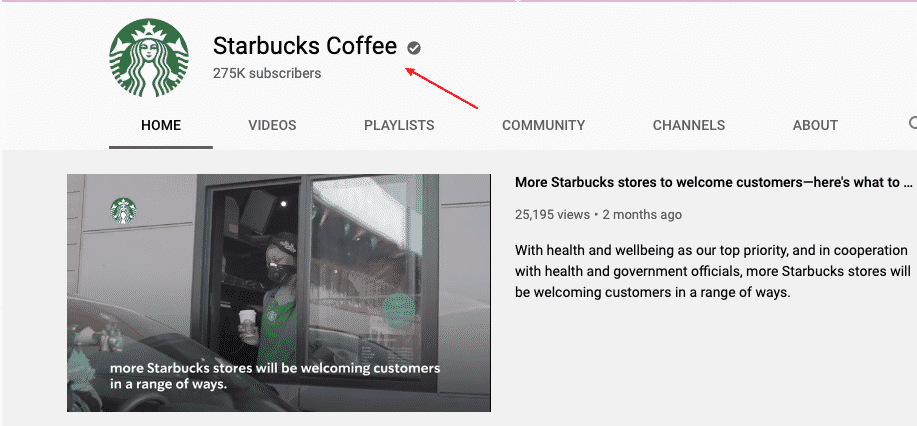
YouTube Starbucks channel

Instagram

Instagram comes with an interface well-suited for visual marketing. The platform is an excellent fit for fashion, food and travel-related businesses.

There are a host of other platforms such as Twitter, TikTok, email, guest blogging and so on. Find two or three platforms that work well for your business. The idea is to achieve better business outcomes by matching the channel voice and content voice.

5. Document Your Brand Voice

Once you have defined your brand purpose, brand archetype, audience personas and content channels, you can start documenting your brand voice. Organize a brainstorming session to find emotional words and phrases that represent your brand voice. Here are some examples:

  • Hubspot: Enthusiastic, Positive, Helpful
  • Slack: Friendly, Clear, Concise

Slack brand voice

  • Dollar Shave Club: Straightforward, Casual, Funny
  • Mailchimp: Plainspoken, Genuine, Dry Humor
  • Apple: Confident, Quality, Intimate

Apple brand voice

When developing your brand voice, you need to start an inward journey.  Delve deep into your organizational culture. Your company’s values should reflect your brand voice. Boiling down to three words that represent your brand is a great way to own a distinct emotional real estate. The brand voice helps to create a bridge between a business and its audience – the medium, of course, is content marketing.

6. Develop Branded Content Guidelines

A content style guide works as the vital next step – it works as a ready reckoner for the content team. It includes the details of how to align the content strategy to the brand voice. A content style guideline has three elements: voice, tone, and style. The following diagram explains these three concepts.

Content style guidelines - Tone, voice, style

Image source: impactbnd.com

  • Pick out existing content pieces to understand which ones genuinely represent your brand voice. Use these as benchmarks for your content team.
  • Define a set of dos and don’ts that will help the content team use a consistent voice. You need to create a document that translates emotional values into examples of text and visuals. The following image shows how to create a brand voice chart that explains brand goals into content voice.
  • Add language nuances in the content style guideline document. An adaptive style guide includes instructions on how to change the tone for different audience segments and content channels.
  • Include a section about jargon – it’s better to do away with complicated and ambiguous terms. Include phraseology that the audience will understand and appreciate.
  • Add a formatting guide – convey how to use bullets, hyphens, quotes and lists. A style guide includes editorial rules such as how to treat certain punctuation and spellings. Although these are separate from content tone and voice, they can be an integral part of your guideline document. The idea is to give the team a manual that helps them maintain style consistency.
  • Incorporate visual content into your brand identity style guide. As much as written text, it’s essential to make sure that the visuals are consistent with your brand voice. Add finer details such as color usage, logo placement and fonts.
  • If you have an influencer marketing strategy, then make sure you create guidelines around how to find and work with the right influencers. Share examples of the type of influencer relationships that match your content voice. It’s essential to track each influencer for change in content tone and voice.

A detailed branded content document is a vital resource to maintain a consistent content marketing message and style.

6. Focus on the Implementation

After you have documented your content marketing voice, you may feel like most of the work is complete, but that’s not true. Here are some quick tips that will help your team follow your branded content guidelines:

  • Make sure that you hire a content team that understands your brand values. For example, a content writer or a graphic designer whose interest areas are fashion and food may not fit well in a B2B content team and vice versa. Look for people who feel a strong connection with the brand and the organizational culture.
  • Conduct a regular content audit to make sure that the content team produces pieces that adhere to the content guidelines.
  • Regular appraisals and feedback help fix shortfalls and bring a level of accuracy.
  • At the same time, allow your team a certain level of creative freedom. Help the team to evolve and produce content that meets quality benchmarks as well as the brand guidelines.

A significant part of aligning your content strategy with your brand voice is about achieving a high degree of consistency.

Final Thoughts

Don’t let branded content drown in the ocean of content available on the internet. Do the homework of building up a solid foundation – create a content marketing voice. It’s what honest and authentic brands do consistently.

Work diligently to discover your brand purpose and audience personas. Put effort into infusing your brand voice into each of your content pieces and be firm about the implementation. A consistent content voice is a sure shot winner – an essential way to get recurring sales for your business.

_

About the author: Abhishek Talreja is a passionate writer and an experienced content marketing expert. He has contributed to top marketing blogs and works with international companies as a content and branding coach. He is the founder of Prolific Content Marketing.

[Podcast] Chris Do’s Biggest Mistakes, Failures & Regrets

Chris Do reveals his biggest mistakes, failures & regrets, plus shares how you too can overcome these adversities. We then dive into how to get paid more as a creative, how to move into brand strategy & sell it, Chris’s strategic branding process, the powers & pitfalls of the labels we put on ourselves and the quest for success.

Chris Do is an Emmy award-winning designer, director, CEO and Chief Strategist of Blind and the founder of The Futur—an online education platform with the mission of teaching 1 billion people how to make a living doing what they love.

Listen Here

Love the show? Please review us on Apple or Stitcher.


Play Now


Watch on Youtube

.

Show Notes

Learn Brand Strategy

Best Brand Strategy Course Online

Brand Master Secrets helps you become a brand strategist and earn specialist fees. And in my opinion, this is the most comprehensive brand strategy course on the market.

The course gave me all the techniques and processes and more importantly… all the systems and tools I needed to build brand strategies for my clients.

This is the consolidated “fast-track” version to becoming a brand strategist.

I wholeheartedly endorse this course for any designer who wants to become a brand strategist and earn specialist fees.

Check out the 15-minute video about the course, which lays out exactly what you get in the Brand Master Secrets.


Show Transcript

Coming soon.

Monday, 24 August 2020

Top 8 Gaomon Tablets for Graphic Design

While not a household name like some of their competitors, Gaomon continuously crafts incredible tablets for graphic designers and we felt that it was beyond time that we share with you, our loyal readers, what the best Gaomon tablets for graphic designers are. By the end of the article, we hope that you’ll agree that the next time you’re in the market for a new graphics tablet, the products that Gaomon offers will be at the top of your list.

Before we start though, let’s begin with a vocabulary lesson and go over some terms used with graphics tablets that are good to know before you start shopping.

Top Laptops

Top Gear for Video Editing

More Top Gear for Designers

View All Buying Guides


Graphics Tablet Terms To Know

If you’re new to the world of graphics tablets, when you first start shopping, there can be some terms thrown about that you might not understand. So, to make shopping for a Gaomon tablet as easy as possible, please allow us to fill in the blanks.

Active Area

The simplest explanation (and usually the easiest) is that the active area is the area on the tablet where you will do whatever work you’re doing. In the case of a pen display, that can be the screen that you create your image and see results right on the tablet. With a pen tablet, generally, it will be an area that when you draw or write in that area, it will show on your computer screen. Having a larger active area is better depending on the type of work you’re doing but with that size comes a higher cost in many cases.

HotKeys

If you’ve ever heard the term or used a shortcut to get something done, then you already know what a HotKey is. If you’re working on a pen tablet, having to break out a mouse or keyboard to change settings is akin to pounding your head against the wall. With HotKeys, you can set these up however you want to help you save time and streamline your work.

Pressure Sensitivity

Pressure sensitivity is something you will see listed under the specifications for the tablet and unless you’re familiar with it, you might think its how much pressure you can put on it without the screen cracking (it’s not. Don’t do this.). Pressure Sensitivity is how responsive the tablet will be to the pen strokes you make with the stylus. A higher number means that the tablet is more responsive and you can add finer details to your work. In this case, a higher number is better and doesn’t affect the overall price that much.

Resolution

Now just about everyone knows or has heard the term resolution although it’s usually in regards to your television. The concept is the same here with pen displays as they can come with 1080p or better resolutions. Pen tablets however have their resolutions measured in LPI, Lines per inch. The more lines per inch that a tablet has, the more precise you can get with your work, leading you to create incredible artwork. The standard LPI is 5,080 and is found on most tablets.

Pen

No, we’re not talking about a nice Montblanc pen here. The pen used on a graphic tablet has come a long way from the stylus that came with PalmPilot back in 1997. There are typically two versions of a graphic tablet pen: battery-operated and electromagnetic resonance. EMR’s are built to react to the active area of the tablet while a battery-powered pen has a finer point to them and is meant for pen-to-tablet drawing.

Wireless or Wired

While many designers may choose a wireless tablet because of the freedom it provides, others may prefer a wired version because they prefer to view the art they are creating to be on their desktop monitor so they can see everything that they do. Choosing between a wired or wireless tablet is like choosing between Pepsi and Coca-Cola. It comes down to personal choice. If you hate the idea of plugging into work, or hate having to look down or feel like your hand might get in the way of your work, then the tablet you choose may be easy.

Top 8 Gaomon Tablets for Graphic Design – Overview

While Gaomon tablets aren’t a household name outside of those who work in graphic design, our choices for the best Gaomon tablets for graphic design is sure to change that. Here’s our list of the best available:

Top 8 Gaomon Tablets for Graphic Design Compared

Thumbnail
Best All - Round
GAOMON M10K2018 10 x 6.25 inches Graphic Drawing Tablet 8192 Levels of Pressure Digital Pen Tablet...
Best Value
GAOMON PD1161 11.6 Inches HD IPS Tilt Support Graphics Drawing Pen Display with 8 Shortcuts and 8192...
Best For Beginners
GAOMON S620 Graphics Tablet 6.5 x 4 Inches Pen Tablet with 4 Express Keys and Battery-Free Pen for...
An Affordable Option
GAOMON PD156PRO 15.6” Full-Laminated Graphics Drawing Display with 8192 Levels Pen Pressure...
Best Budget Friendly
GAOMON PD1561 Pen Display with Tilt-Support Battery-Free 8192 Level Pen 10 Shortcut Keys HD Screen...
GAOMON PD1560 15.6 Inches 8192 Levels Pen Display with Arm Stand 1920 x 1080 HD IPS Screen Drawing...
Title
GAOMON M10K2018 10 x 6.25 inches Graphic Drawing Tablet 8192 Levels of Pressure Digital Pen Tablet...
GAOMON PD1161 11.6 Inches HD IPS Tilt Support Graphics Drawing Pen Display with 8 Shortcuts and 8192...
GAOMON S620 Graphics Tablet 6.5 x 4 Inches Pen Tablet with 4 Express Keys and Battery-Free Pen for...
GAOMON PD156PRO 15.6” Full-Laminated Graphics Drawing Display with 8192 Levels Pen Pressure...
GAOMON PD1561 Pen Display with Tilt-Support Battery-Free 8192 Level Pen 10 Shortcut Keys HD Screen...
GAOMON PD1560 15.6 Inches 8192 Levels Pen Display with Arm Stand 1920 x 1080 HD IPS Screen Drawing...
Prime Status
Star Rating
Reviews
919 Reviews
233 Reviews
55 Reviews
4 Reviews
57 Reviews
856 Reviews
Active Drawing Area
255.06 x 159.84mm
256.32 x 144.18 mm
165.1 x 101.6 mm
344.16 x193.59mm
344.16 x 193.59 mm
13.5 x 7.6in
Resolution
5080 LPI
1,920 x 1,080
5080 LPI
1,920 x 1,080
1,920 x 1,080
1,920 x 1,080
Pen Pressure Sensitivity
8,192 levels
8,192 levels
8,192 levels
8,192 levels
8,192 levels
8,192 levels
Connections
Micro USB
HDMI, USB 2.0
Micro-USB
USB-C
Mini HDMI, USB-C
USB
Price
$57.63
$239.99
$39.99
$399.00
$379.99
$329.89
Best All - Round
Thumbnail
GAOMON M10K2018 10 x 6.25 inches Graphic Drawing Tablet 8192 Levels of Pressure Digital Pen Tablet...
Title
GAOMON M10K2018 10 x 6.25 inches Graphic Drawing Tablet 8192 Levels of Pressure Digital Pen Tablet...
Prime Status
Star Rating
Reviews
919 Reviews
Active Drawing Area
255.06 x 159.84mm
Resolution
5080 LPI
Pen Pressure Sensitivity
8,192 levels
Connections
Micro USB
Price
$57.63
Buy Now
Best Value
Thumbnail
GAOMON PD1161 11.6 Inches HD IPS Tilt Support Graphics Drawing Pen Display with 8 Shortcuts and 8192...
Title
GAOMON PD1161 11.6 Inches HD IPS Tilt Support Graphics Drawing Pen Display with 8 Shortcuts and 8192...
Prime Status
Star Rating
Reviews
233 Reviews
Active Drawing Area
256.32 x 144.18 mm
Resolution
1,920 x 1,080
Pen Pressure Sensitivity
8,192 levels
Connections
HDMI, USB 2.0
Price
$239.99
Buy Now
Best For Beginners
Thumbnail
GAOMON S620 Graphics Tablet 6.5 x 4 Inches Pen Tablet with 4 Express Keys and Battery-Free Pen for...
Title
GAOMON S620 Graphics Tablet 6.5 x 4 Inches Pen Tablet with 4 Express Keys and Battery-Free Pen for...
Prime Status
Star Rating
Reviews
55 Reviews
Active Drawing Area
165.1 x 101.6 mm
Resolution
5080 LPI
Pen Pressure Sensitivity
8,192 levels
Connections
Micro-USB
Price
$39.99
Buy Now
An Affordable Option
Thumbnail
GAOMON PD156PRO 15.6” Full-Laminated Graphics Drawing Display with 8192 Levels Pen Pressure...
Title
GAOMON PD156PRO 15.6” Full-Laminated Graphics Drawing Display with 8192 Levels Pen Pressure...
Prime Status
Star Rating
Reviews
4 Reviews
Active Drawing Area
344.16 x193.59mm
Resolution
1,920 x 1,080
Pen Pressure Sensitivity
8,192 levels
Connections
USB-C
Price
$399.00
Buy Now
Best Budget Friendly
Thumbnail
GAOMON PD1561 Pen Display with Tilt-Support Battery-Free 8192 Level Pen 10 Shortcut Keys HD Screen...
Title
GAOMON PD1561 Pen Display with Tilt-Support Battery-Free 8192 Level Pen 10 Shortcut Keys HD Screen...
Prime Status
Star Rating
Reviews
57 Reviews
Active Drawing Area
344.16 x 193.59 mm
Resolution
1,920 x 1,080
Pen Pressure Sensitivity
8,192 levels
Connections
Mini HDMI, USB-C
Price
$379.99
Buy Now
Thumbnail
GAOMON PD1560 15.6 Inches 8192 Levels Pen Display with Arm Stand 1920 x 1080 HD IPS Screen Drawing...
Title
GAOMON PD1560 15.6 Inches 8192 Levels Pen Display with Arm Stand 1920 x 1080 HD IPS Screen Drawing...
Prime Status
Star Rating
Reviews
856 Reviews
Active Drawing Area
13.5 x 7.6in
Resolution
1,920 x 1,080
Pen Pressure Sensitivity
8,192 levels
Connections
USB
Price
$329.89
Buy Now


Top 8 Gaomon Tablets for Graphic Design

GAOMON PD1161 – $239


GAOMON PD1161Gaemon Tablet Review

The best value for money tablet

Active drawing area: 256.32 x 144.18 mm | Resolution: 1,920 x 1,080 | Pen pressure sensitivity: 8,192 levels | Connections: HDMI, USB 2.0

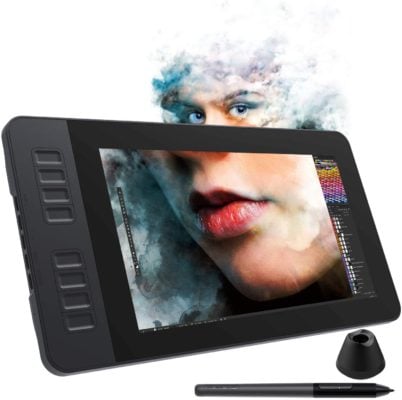
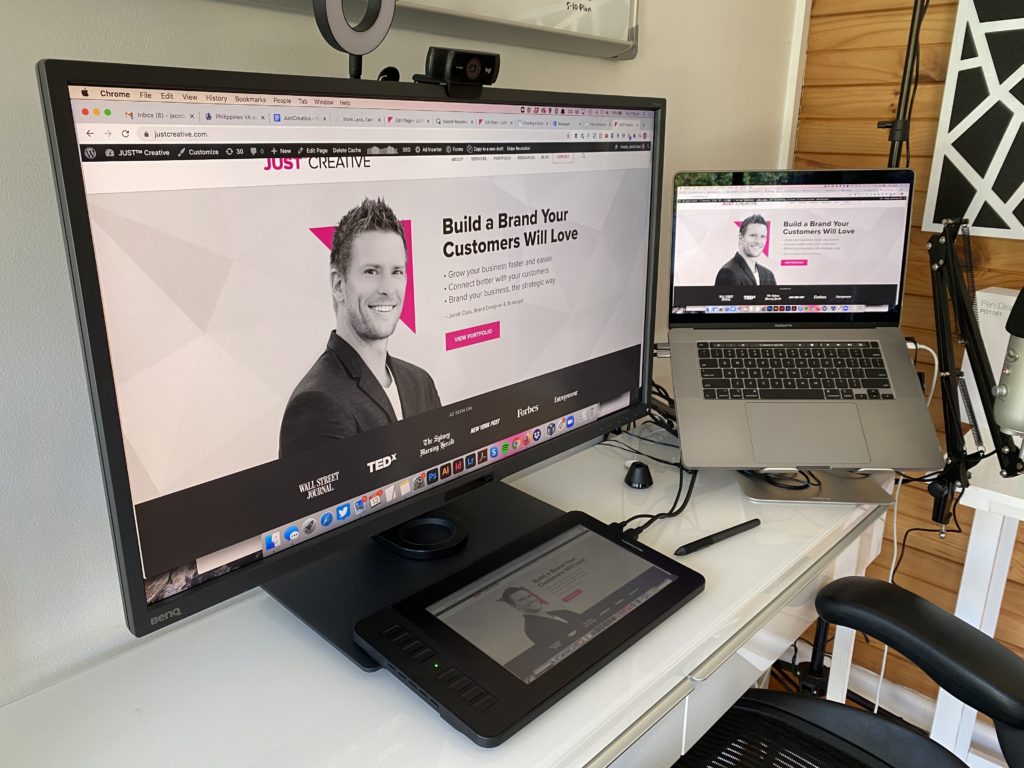
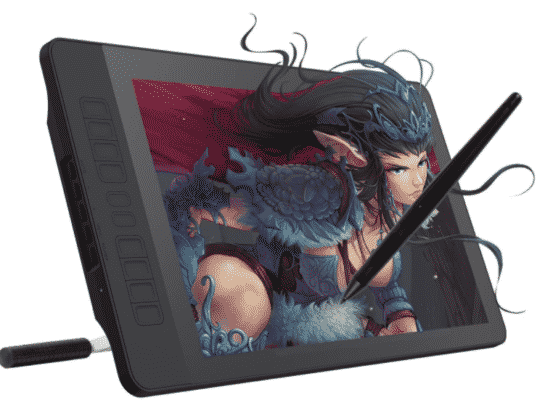
Combining a great tablet at an affordable price, the PD1161 is a great choice for any designer. Boasting an 11.6-inch monitor with Full HD resolution, you know that your artwork will look as crisp as it possibly can. The AP50, a battery-free digital pen provides you with the tool you need to create amazing images and with 8,192 levels of pressure sensitivity, each stroke will be as accurate as possible. The tablet is equipped with eight programmable buttons that can help make your work easier. Overall, PD1161 is a high-quality tablet at a great price. You can see it in use above on Jacob’s workstation.

Learn More


Latest Price on Amazon:

GAOMON PD1161 11.6 Inches HD IPS Tilt Support Graphics Drawing Pen Display with 8 Shortcuts and 8192...
233 Reviews
GAOMON PD1161 11.6 Inches HD IPS Tilt Support Graphics Drawing Pen Display with 8 Shortcuts and 8192...
  • 【FOR ONLINE TEACHING & MEETING】You can use PD1161 pen display for online education and remote meeting. It works with most online meeting programs, like Zoom, and so on. 【FOR DIGITAL ART &...
  • 【8192 LEVEL PRESSURE PASSIVE PEN】-- It adopts battery-free pen coming with 2 programmable buttons. 8192 level pressure ensure smooth and neat lines.【TILT SUPPORT】--It supports tit function,...
  • 【LIGHT WEIGHT & PORTABLE】-- With 866g (1.9lb) net weight, 11.6 inch PD1161 pen display monitor is easy to be carried to anywhere you need, like the workplace, school, outdoor painting and a...
  • 【OS SUPPORT & PROGRAM COMPATIBILITY】-- Only compatible with Win 7 or above , or macOS 10.12 or above versions. Ideal tool for drawing, photography, animation,sketching, image editing, 3D...
  • 【IPS FULL HD SCREEN】--Screen Resolution: 1920x1080 (16:9); Viewing able: 89°/89°(H)/89°/89°(V) (Typ.)(CR>10); 【WITH AG-FILME PRE-APPLIED】--To protect the PD1161 drawing display during...


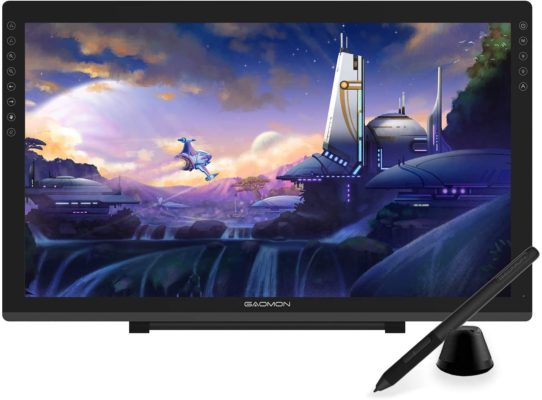
GAOMON PD2200 – $439

GAOMON PD2200

The best large drawing area tablet

Active drawing area: 476.64 x 268.11mm | Resolution: 1,920 x 1,080 | Pen pressure sensitivity: 8,192 levels | Connections: HDMI, USB 2.0

The PD2200 from Gaomon is quite simply a beast of a machine. With a huge 16×9 active area, Full HD resolution, and 8,192 levels of pressure sensitivity, it may be in the running for one of the best graphics tablets in general. Tilt support of up to 60 degrees keeps you from sitting awkwardly and the OSD touch keys help you easily turn the display on and off. Packed with a battery-free pen and shortcut keys to help you streamline your work, it is one of the best tablets that Gaomon makes.

Learn More


Latest Price on Amazon:

GAOMON PD2200 Full-Laminated Tilt-Support 92% NTSC Pen Display with 8 Touch Buttons -21.5 Inch HD...
131 Reviews
GAOMON PD2200 Full-Laminated Tilt-Support 92% NTSC Pen Display with 8 Touch Buttons -21.5 Inch HD...
  • 【FOR ONLINE TEACHING & MEETING】You can use GAOMON PD2200 pen display tablet for online education and remote meeting. It works with most online meeting programs, like Zoom, and so on. 【FOR...
  • 【HD FULL-LAMINATED SCREEN & 92% NTSC】--Visually the parallax will be deduced to the lowest level. 【WITH AG-FILME PRE-APPLIED】--To protect the PD2200 drawing monitor during long shipping...
  • 【8192 LEVELS PRESSURE & PASSIVE PEN】【TILT SUPPORT FUNCTION】--GAOMON PD2200 Drawing Display Tablet uses 8192 battery-free pen with tilt support function allow you to create your remarkable...
  • 【2000: 1 CONTRAST RATIO】--Enables more clear and vivid images effects. 【OTHER DISPLAY INFO】--Max Viewing Angle: 89°/89°(H)/89°/89°(V) (Typ.)(CR>10). Display Area: 476.64 x...
  • 【OS SUPPORT& PROGRAM COMPATIBILITY】--Work with laptops or desktops which run Windows 7/8/8.1 or above, Mac OS 10.12 or above; compatible with most of major drawing software such as Photoshop、SAI...


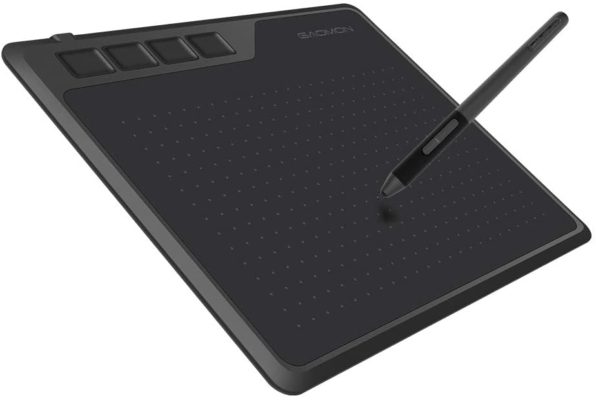
GAOMON S620 – $39

GAOMON S620

A budget-friendly tablet for beginners

Active drawing area: 165.1 x 101.6 mm | Resolution: 5080 LPI | Pen pressure sensitivity: 8,192 levels | Connections: Micro-USB

Whether you’re a professional artist or just getting your feet wet, having a quality pen tablet to use in your design work is critical. The S620 allows you to design, sketch, or draw with ease without the hassles of compromises or inconveniences. The 6.5 x 4-inch active area gives you a decent amount of room to work without any glitches. The pen comes with EMR technology and with 5080 LPI resolution on the tablet allows you to use various pen traces and use the pen efficiently every time you work.

Learn More


Latest Price on Amazon:

GAOMON S620 Graphics Tablet 6.5 x 4 Inches Pen Tablet with 4 Express Keys and Battery-Free Pen for...
55 Reviews
GAOMON S620 Graphics Tablet 6.5 x 4 Inches Pen Tablet with 4 Express Keys and Battery-Free Pen for...
  • [Battery-Free Pen] The pen adopts the most advanced passive technology,no battery and no charging required, allows constant drawing.Two customized express keys on pen,provide you convenient work...
  • [4 Customizable Express Keys] The Digital Graphics Drawing Tablet with 4 customizable express keys that can be set up as needed to increase your productivity.
  • [8192 Levels Pen Pressure] 8192 levels of pressure sensitivity, makes the line more conveniently and naturally.Report Rate: 266 RPS/Resolution: 5080 LPI/Reading Height: 10 mm/Working Area: 6.5 x 4...
  • [Lightweight Design&Tech Support] GAOMON S620 is only 8mm thick, 1.23 pounds.It’s a portable and lightweight graphic tablets, allowing you to carry it everywhere. GAOMON provides provide lifetime...
  • [Multi-compatible Software& Windows & Mac OS & Android ]Be compatible with Win 7/8/10 and mac OS 10.12 or above,Android phone 6.0 or above.Please note that the android phone must with OTG function. Be...


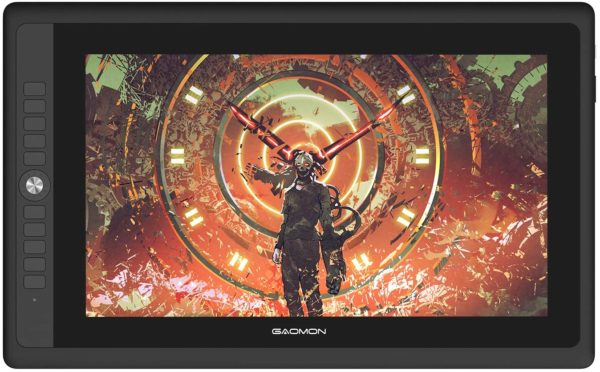
GAOMON PD156 Pro – $399

GAOMON PD156PRO

A well-sized pen display at a price that might amaze you

Active drawing area: 344.16 x193.59mm | Resolution: 1,920 x 1,080 | Pen pressure sensitivity: 8,192 levels | Connections: USB-C

The PD156 Pro is a great graphics tablet for any designer and with a screen resolution of 1920 x 1080, everything you draw will look incredible. Designed with nine shortcut buttons, Gaomon includes a tenth button called an OSD switch. This switch can help with settings such as brightness, color, contrast, and more. Also included is a Multishortcut Dial, which is a new feature on the PD156 Pro and allows you to perform complex shortcut actions such as scroll, zoom, or even change the size of the brush. With so many features and a free tablet stand, the PD156 Pro is an excellent choice for your next tablet.

Learn More


Latest Price on Amazon:

GAOMON PD156PRO 15.6” Full-Laminated Graphics Drawing Display with 8192 Levels Pen Pressure...
4 Reviews
GAOMON PD156PRO 15.6” Full-Laminated Graphics Drawing Display with 8192 Levels Pen Pressure...
  • [15.6 Inch Full-Laminated IPS Monitor & 88% NTSC Color Gamut]--PD156PRO comes with a 15.6 inches full HD screen which adopts the advanced full-laminated technology. Moreover, 88%NTSC color gamut and...
  • [9 Customized Shortcut Keys & 1 OSD Button & 1 Functional Quick Dial]--There are 10 buttons on the left side of PD156 PRO. The last one is the OSD button, and others are programmable express keys, you...
  • [User-friendly Design]--Features USB Type-c interface, simplify the connection process, make it easier to plug in and out. It comes with 2-in-1 cable, power adaptor, and Y-cable. The combine cable...
  • [8192 Levels Passive Pen & Support 60 Degrees Tilt Function]--Passive pen AP50 with 8192 levels pressure-sensitive and support 60 degrees tilt which can create every sharp detail in art. In addition,...
  • [OS Support& Program Compatibility]--Work with laptops or desktops which run Windows 7/8/8.1 or above, Mac OS 10.12 or above; compatible with most of the major drawing software such as...


GAOMON PD1560 – $329

GAOMON PD1560

A feature-rich tablet, just not very portable

Active drawing area: 13.5 x 7.6in | Resolution: 1,920 x 1,080 | Pen pressure sensitivity: 8,192 levels | Connections: USB | OS: Windows or macOS

The PD1560 has a lot of great things going for it. From the 16 x 9 drawing surface to the intelligent pen with 8,192 levels of pressure sensitivity, there is a lot to like about the tablet especially if you like working at your desk all day. With 10 shortcut keys, you can customize each one to match your workflow. If you like to work on the go, then this may not be the tablet for you as it doesn’t have the wireless functionality that many others do.

Learn More


Latest Price on Amazon:

Sale
GAOMON PD1560 15.6 Inches 8192 Levels Pen Display with Arm Stand 1920 x 1080 HD IPS Screen Drawing...
856 Reviews
GAOMON PD1560 15.6 Inches 8192 Levels Pen Display with Arm Stand 1920 x 1080 HD IPS Screen Drawing...
  • 【FOR ONLINE TEACHING & MEETING】You can use PD1560 pen display for online education and remote meeting. It works with most online meeting programs, like Zoom, and so on. 【FOR DIGITAL ART &...
  • 【10 EXPRESS KEYS & 8192 PEN PRESSURE SENSITIVITY】-- 10 shortcut keys are customizable . 8192 leves's pen pressure gives you better control of lines. About 2 hours to 2.5 hours for full charge of...
  • 【ADJUSTABLE STAND】-- You can find a perfect and comfortable position by dragging the switch to adjust the angle of pen display . 【3-in-1 CABLE】-- To reduce the cable clutter.f there is no hdmi...
  • 【OS SUPPORT& PROGRAM COMPATIBILITY】-- Windows 7/8/10 or later, Mac OS 10.11 or later; compatible with most major drawing software. Works great Photoshop、Pant Tool SAI 2、Cilp Studio Paint,...
  • 【Others】---Please use extra hdmi adapter if there is no hdmi port on your computers. We don't usb to hdmi adapter. And better using one to one type hdmi adapter instead of multi ports hub. If you...


GAOMON M10K 2018 – $65

GAOMON M10K 2018

A complete pen tablet for all of your needs

Active drawing area: 255.06 x 159.84mm | Resolution: 5080 LPI | Pen pressure sensitivity: 8,192 levels | Connections: Micro USB

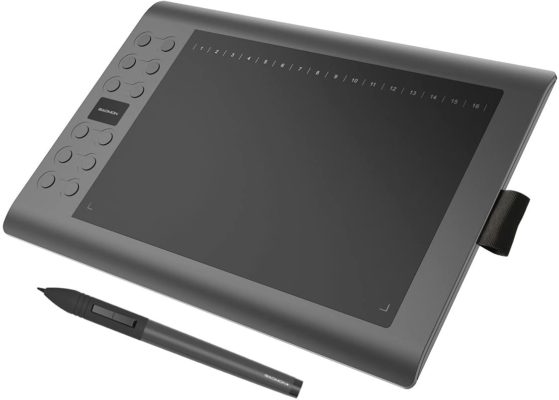
In an all-digital world, having instant access to something is quickly becoming the new normal and this certainly applies to graphic design as well. Having a tablet that you can use to instantly create beautiful artwork or simply basic sketches is what the M10K offers. Offering a good size active area, the tablet comes with 10 shortcut keys that you can use to streamline your workflow as well as a touch ring that can be used for scrolling, zoom, and adjusting the brush. Along with a battery-free pen, you can have instant access to creating amazing artwork with the M10K tablet.

Learn More


Latest Price on Amazon:

Sale
GAOMON M10K2018 10 x 6.25 inches Graphic Drawing Tablet 8192 Levels of Pressure Digital Pen Tablet...
919 Reviews
GAOMON M10K2018 10 x 6.25 inches Graphic Drawing Tablet 8192 Levels of Pressure Digital Pen Tablet...
  • [Battery -free Pen]---The pen adopts the most advanced passive technology at present, no need to charge or replace the battery, so it's always ready whenever you want to create art,avoiding trouble of...
  • [8192 Levels Pen Pressure]---The pen features 8192 levels of pressure sensitivity, helps you to draw thicker or thinner lines depending on how hard you push on the pen. It makes lines smoother and...
  • [High Performance]--Working Area:10 x 6.25 inches (255*159mm);Pressure Sensitivity: 8192 levels; Pen Touch Resolution:5080 LPI; Report Rate:233PPS; Sensing Height:10mm
  • [1 Touch Ring+1 Round Key+10 Hot-keys]---The touch ring could be programmed for canvas zooming, brush adjusting and page scrolling ( zoom in/out and roll ). The round key designed to shift function...
  • [Compatibility]---Windows 7/8/10, Mac 10.12 or later version. And it’s compatible with most drawing program,such as: Photoshop, Krita, Illustrator, SAI2, SketchBookPro, FireAlpaca, OpenCanvas, Manga...


GAOMON M106K – $59

GAOMON M106K

A worthy Intuos competitor

Active drawing area: 10 x 6 in | Resolution: 5080 LPI | Pen pressure sensitivity: 2,048 levels | Connections: USB 2.0

Regarded by some as one of the best pen tablets available, the M106K may have a more affordable price when compared to models released by Wacom but you should believe that this means any reduction in quality. The M106K has an LPI resolution of 5080, higher than the Intuos S, and a reading speed of 233 PPS (points per second), providing you with nearly lag-free and super precise drawing experience. 12 customizable keys, located on the side of the active area, let you streamline your work without getting in the way. Packed with the ArtPaint AP20, a lightweight, battery-free pen, it provides a good range of light to heavy lineage despite the lower pressure sensitivity.

Learn More


Latest Price on Amazon:

GAOMON M106K 10 x 6 Inches Painting Digital Graphics Pen Tablet with 12 Express Keys and 16 Softkeys
285 Reviews
GAOMON M106K 10 x 6 Inches Painting Digital Graphics Pen Tablet with 12 Express Keys and 16 Softkeys
  • 【FOR ONLINE TEACHING & MEETING】You can use GAOMON M106K pen tablet for online education and remote meeting. It works with most online meeting programs, like Zoom, and so on. 【FOR DIGITAL ART &...
  • 【12 SHORTCUT KEYS & 16 SOFTKEYS】They are easy to set and easy to customize in GAOMON driver. 【LEFT-HANDED & RIGHT-HANDED SUPPORT】--Default mode is right-hand mode. Left-hand mode setting: Open...
  • 【LARGE WORK AREA & LIGHT WEIGHT】10 x 6.25 inches drawing area enable you more space to create freely. It's very portable, 780g net weight. 【A PEN JACKET】-It provides portability to carry the...
  • 【OS SUPPORT& PROGRAM COMPATIBILITY】Windows 7/8/10 or later, Mac OS 10.12 or abover; compatible with most major drawing software. Works great with Photoshop、Pant Tool SAI 2、Krita, Firealpaca,...
  • 【TIPS FOR MAC USERS】When using mac mojave 10.14 OS, remember to add ''GaomonTablet'' and ''TabletDriverAgent'' into Security&Privacy Accessibility Box. Not only GAOMON Driver, all newly downloaded...


GAOMON PD1561 – $379

GAOMON PD1561

The best budget-friendly high-end tablet

Active drawing area: 344.16 x 193.59 mm | Resolution: 1,920 x 1,080 | Pen pressure sensitivity: 8,192 levels | Connections: Mini HDMI, USB-C

One of the more popular options created by Gaomon, the PD1561 features the same pressure sensitivity and tilt ratings as other much more expensive options in the market, and also comes with 10 built-in shortcut buttons for customized control. One big feature that separates the PD1561 from the others on the market is that it comes with a stand so you don’t have to spend more money. While it is slightly less precise than its more expensive cousin, the tablet is still an amazing value for the price and can provide you with an excellent tablet for your designs.

Learn More


Latest Price on Amazon:

Sale
GAOMON PD1561 Pen Display with Tilt-Support Battery-Free 8192 Level Pen 10 Shortcut Keys HD Screen...
57 Reviews
GAOMON PD1561 Pen Display with Tilt-Support Battery-Free 8192 Level Pen 10 Shortcut Keys HD Screen...
  • 【FOR ONLINE EDUCATION & MEETING】You can use GAOMON PD1561 pen monitor for online education and remote meeting. It works with most online meeting programs, like Zoom, and so on. 【FOR DIGITAL ART...
  • 【10 SHORTCUT KEYS & 2 CUSTOMIZABLE PEN BUTTONS】-- There are 10 shortcut keys on the left side of PD1561 and 2 pen buttons available to be customized according to your own creative habits, like...
  • 【IPS HD DISPLAY & FILM】 【】-1920*1080 HD IPS FULL Screen ensures high quality and accuracy of color, lines and images. Viewing Angle: 178°Screen Resolution: 1920 x 1080(16:9) Colour gamut:...
  • 【LEFT HAND SUPPORT】-If using Windows OS, Computer Setting: Press “windows”+”p” on keyboard>set as extended mode>enter display setting>set PD1560 Display Orientation:...
  • 【 OS SUPPORT & PROGRAM COMPATIBILITY 】Work with laptops or desktops which run Windows 7/8/8.1 or above, Mac OS 10.12/13/14 or above; Compatible with most painting software, like Adobe Photoshop,...


Top 8 Gaomon Tablets for Graphic Design

While not as well known as some of the other options on the market, the tablets from Gaomon are an excellent option for any designer no matter what career level they are at. We hope that we’ve brought the amazing tablets from Gaomon into focus for you and when you’re in the market for a new tablet, a tablet from Gaomon is on your list.