The keyboard is an integral part of the life of a programmer or a coder.
Over the years, several companies have worked on new ideas to come up with the best keyboard for this set of audience. Newer innovative approaches, efficient selection of materials, and fresh paradigms of aesthetics have resulted in a wide range of keyboard types.
Read on to learn how to choose the best keyboard for your programming and coding need.
How to Choose the Best Keyboards for Programming and Coding?
To select from this lot, one needs to be mindful of a few defining parameters.
The Ergonomics
The coders and programmers are selective about their options. Them being choosy has some specific reasons. First and foremost, the programmers and coders use their keyboards a lot. They spend long sessions typing on them. Therefore, the keyboard has to be ergonomic. It’s great if the keyboards have some extra space between the left and the right part. It helps to maintain a healthy shoulder-distance length between the hands while typing. They also need a palm rest and contoured surfaces. A well-rested ergonomically designed keyboard is always useful to avoid RSI or repetitive strain injuries, a common occurrence among programmers.
Durability and Convenience
The keyboard should also have keys that sustain anywhere between 50 and 100 million clicks. The number pad is something that is rarely used by programmers and coders. Therefore, a detachable number pad makes the set-up efficient. Backlights and laser-etched keytops make it easier to type and frees the keyboard from the risks of fading off. It’s better if it’s wireless. Even if it uses cables, detachable cable always proves useful.
Compatibility
The keyboard needs to be compatible with most of the popular operating systems available. Windows PC and Mac OS are the musts. It is better to have compatibility with Linux and Chrome OS as well.
Based on these requirements, we have prepared a list that includes the best keyboards available in the market for programming and coding. This list will help you to cut the clutter and choose the best option available.
Best Keyboards for Programming & Coding
Below is a summary of the recommended keyboards for programming & coding:
- Kinesis Advantage2 Ergonomic Keyboard (KB 600) – $321
- Microsoft Sculpt Ergonomic Wireless Keyboard – $129
- Das Mechanical Keyboard – $149
- US Filco Ninja Majestouch-2 – $133
- Cooler Master Mechanical Keyboard – $99
- Razer BlackWidow Elite Mechanical Keyboard – $126
- Happy Hacking Professional Keyboard – $199
Best Keyboards for Programming Compared

Kinesis Advantage2 Ergonomic Keyboard (KB 600)

For programmers and coders, the most important aspect of their keyboards is the ergonomics of it. They work with their keyboards all day long. Improper design can lead them to repetitive strain injury or RSI. To avoid RSI, one needs to have the keys to be properly-sized and the design well-provisioned for palm rest. Kinesis Advantage2 Ergonomic Keyboard or KB600 serves this purpose perfectly.
The keyboard is divided into two parts, one part on the left and the remaining one on the right. The splits are contoured to allow palm rest. On the left side, there are the CTRL button, Enter, and Space Bar. On the left, there are the Backspace, Delete, and ALT buttons. There is adequate space within these two sides to keep the left and right-hand shoulder-length apart.
The keys are mechanical and can undergo 50 million keypresses. They can either be of two-layered QWERTY design or Dvorak design. Types of these keys can be low force MX ones or red silent MX ones. The keyboard is designed for sustenance and efficient working for many years.
In terms of compatibility, the keyboard goes with all major operating systems. One needs to plugin and use it. It is compatible with Mac OS X, Windows 7 to Windows 10, Chrome, and Linux. The keyboard also comes with several easy setting up and recovery features. Some of these features include one-touch key remapping, macro recording, and 4 MB flash memory with settings saved. For windows, the keyboard also has a Smart Set app GUI.
Kinesis has been operating as a successful keyboard manufacturer since 1992. It’s a well-tested credible product manufactured to provide comfort and durability.
Read More
Latest Price on Amazon:

- CONTOURED ERGONOMIC SHAPE PROVEN TO INCREASE COMFORT AND PRODUCTIVITY: Patented design features split keywells with concave shape, thumb keys, orthogonal layout, 20 degrees of tenting, and integrated...
- GENUINE CHERRY MECHANICAL SWITCHES FOR PREMIUM TYPING FEEL AND PERFORMANCE: Cherry MX Brown mechanical switches feature a low activation force, tactile feedback and are rated for 50 million key...
- Full onboard programmability with the Driverless Smart Set engine: Custom layouts in QWERTY or Dvorak, on-the-fly macro recording, one-touch key remapping, Windows, Mac, PC modes, settings saved to...
- Plug-and-play with all major operating systems: Windows 7-10, Mac OS X, Linux, Chrome.
- 3 YEAR MANUFACTURER'S WARRANTY: Buy with confidence knowing that Kinesis engineers all our products in the USA to the highest standards and stands behind them 100 percent since 1992.
Microsoft Sculpt Ergonomic Wireless Keyboard
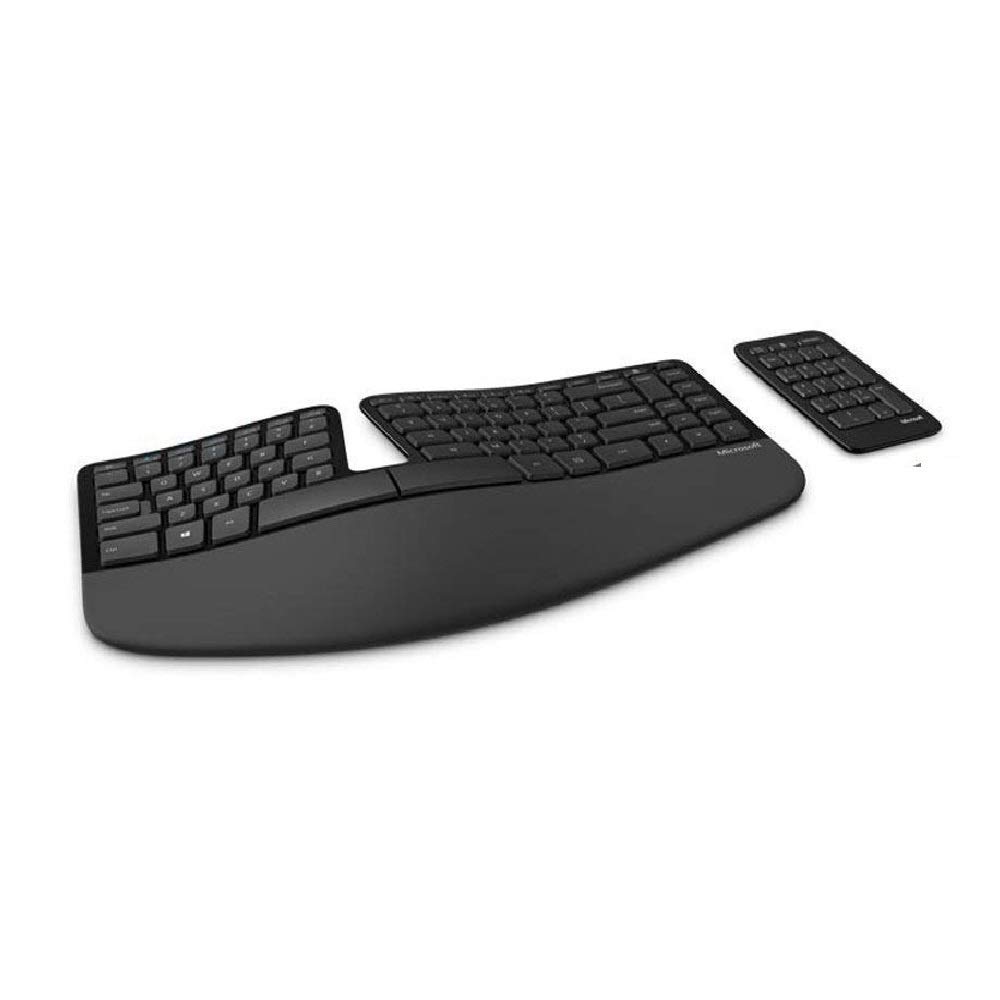
This keyboard by Microsoft serves the same purpose as Kinesis. Although its design is much different from the Kinesis keyboard the logic behind the design is almost the same. It separates the left and right sides of the keyboard with a blank space in between. This creates a comfortable distance between the left and right hand of the programmer/coder.
Another feature that makes this item different from most of the regular keyboards is the tilt. Most of the keyboards are forward- lifted. Microsoft Sculpt is the opposite. This design provides a comfortable user experience when working for long hours on the keyboard. The height of the tilt is adjustable. Users can customize the height according to their comfort.
The palm rest of the keyboard is padded. Moreover, the palm rest is attached to the keyboard with a magnet. One can easily remove the palm rest if one wishes to keep it on his/her lap.
Another useful feature is the detached number pad that comes with the keyboard. For people using the number pad quite regularly, this separate arrangement is helpful. It relieves them from stretching out their hands each time they go for the number pad. The keys are relatively larger. It works in the wireless mode and is free from potential wire-tangle issues.
Read More
Latest Price on Amazon:

- Split keyset design helps to position wrists and forearms in a natural, relaxed position
- Cushioned palm rest provides support and promotes a neutral wrist position
- Domed keyboard design positions wrists at a natural, relaxed angle
- Separate number pad provides greater flexibility for workspace setup
- Natural arc key layout mimics the curved shape of the finger tips
Das Mechanical Keyboard
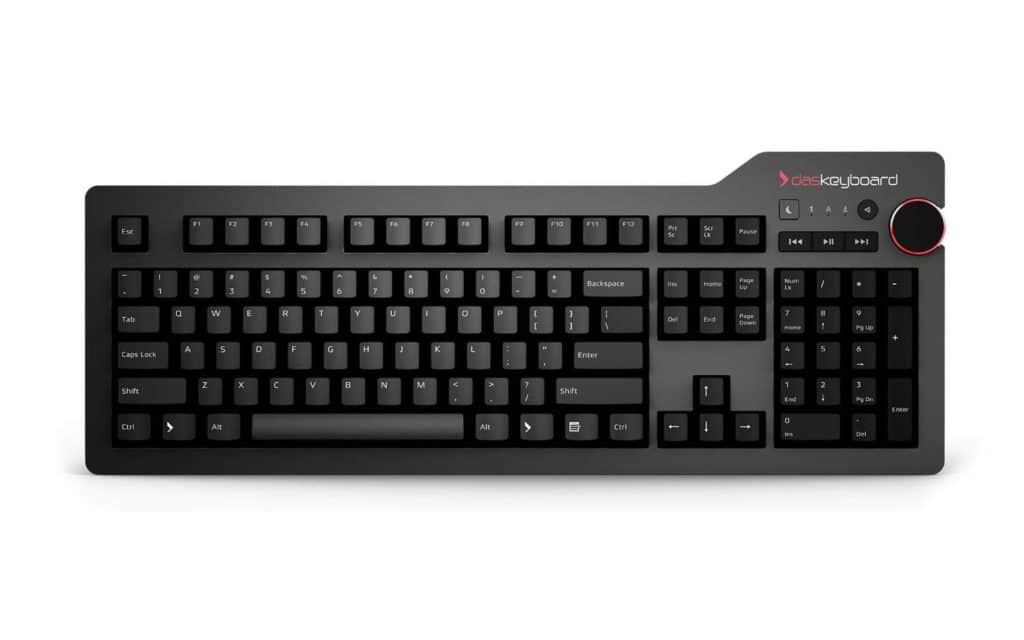
These keyboards are famously sturdy and shock-resistant. It absorbs falls and bends quite easily. The keyboard’s top panel is made of aluminum. Aluminum makes it bendable and breakage-resistant.
The keys on the board are not the conventional Cherry MX switches. Rather the manufacturers shifted to gamma Zulu switches. The MX switches last up to 50 million keypresses. The gamma Zulu switches last double and safely sustain 100 million keypresses. The keys are softer than the traditional MX ones. Many users find it a mix between black and brown Cherry MX switches.
The top right part of the keyboard has a cool volume knob. It also has three media buttons next to the volume knob. These buttons help free up all the function keys.
However, the most enticing aspect of these keyboards is that they can be used to get alerts. Any key on the keyboard can be set to receive a special type of alert. For example, new notifications on the stack overflow comment thread can be tracked. Every time a notification comes, the keys will blink. The keys can also deliver alerts for something outside the system. For example, the ringing of one’s phone can have a blinking alert.
The keyboard is compatible with traditional operating systems such as Windows, Mac, Linux, and Chrome. The USB port supports USB 1.1, 2.0, or 3.0. One needs no driver for the USB. The height of the keyboard is 1.2 inches.
Read More
Latest Price on Amazon:
 Cherry MX Brown mechanical key switches with Gold contacts for a soft Tactile feel and an unmatched typing experience
- rugged construction to withstand 50+ million keystrokes with aluminum top panel
- two port USB 3.0 Super speed hub 5 GB/s; 10x the speed of USB 2.0
- oversized volume knob and dedicated media controls and instant sleep button
- laser etched key inscriptions with Bumps on the F and J keys.Firmware updatable. Elevated height - 1.2 inches (3.1 cm)
US Filco Ninja Majestouch-2

The first thing to notice about these keyboards are the empty keycaps. Programmers and coders type a lot. This leads to faded keycaps. This keyboard has the keys printed on the side. The programmers find this aspect useful. They don’t have to bother about fading alphabets. And, if required, they get to see the characters on the side.
The keys are from the cherry MX series. They are made of plastic. However, the keys are soft yet robust. The keyboard follows the US ASCII arrangement of the keys. However, the layout of the keys can be changed. The product comes with the FILCO key puller to alter the layout.
For the convenience of use, it comes with a cable 1.5 meters long.
The keyboard does not have a backlight. But it lights up three specific keys. The Caps Lock key, the Number key, and the Scroll key.
Dring purchase, one needs to remember that the number pad comes with the full version of the product only. However, one can purchase a number pad separately as well.
The Futura italic font used in the keyboard combined with its sleek all-black look is aesthetically A-class as well.
Read More
Latest Price on Amazon:
- Key switch/Number of keys : Cherry MX Brown Switch (tactile feel)/87 keys , US ASCII key arrangement
- Key pitch/Key stroke : 19mm/4 0.5mm , Cable length : 1.5m
- Dimensions/Weight : W356xD135xH33mm(44mm raised up by stand)/980g
- Interface : PS/2,USB (PS/2 interface is available with PS/2 Conversion Adapter)
- Accessories : Windows key (Printing on front face type), FILCO Key Puller
Cooler Master Mechanical Keyboard

It is one of the best mechanical keyboards available in the market. This keyboard has not kept any provision for the number pad at all. Programmers or coders hardly use a separate number pad. Yet, the number pad occupies additional space. This keyboard, completely doing away with the number pad, helps to free up the workstation.
The cherry MX keyboard has comfortable switches that recognize the press even before reaching the bottom. This makes it require less force to type. The keys are etched using lasers that make them wear-resistant. The keyboard uses backlighting for all the keys.
One can make necessary adjustments to the lighting and the micro without any separate software. The entire keyboard is brushed with aluminum design.
The keyboard is not wireless. But, the wire is detachable. It helps to keep the cable less tangled and easy to carry around. In case someone is using an old computer, the cable is compatible with the PS/2 connector.
Coders and programmers are mostly fast typers. They often press the next key before the system recognizes the earlier one. For PS/2 users, this keyboard provides the benefit of the N-Key rollover. This helps to register every key that has been pressed in that same order.
The package comes with some extra keys and a keycap puller. The extra caps are more useful for gamers. The programmers and coders don’t need them that much. But, many programmers favor fewer keys on their keyboards. This key-customization feature is perfect for that section of users. The key-removal process is easy and swift.
Read More
Latest Price on Amazon:

- Two Keycap Sets: Slightly contoured and flat set, or go with the traditional keycap profile set for that familiar look and touch
- Cherry MX Low Profile Switches: A reduced travel distance and actuation point with the same signature durability and precision
- Brushed Aluminum Design: Slim top plate, floating keycaps, and minimalistic, tenkeyless design built with functionality in mind
- Keep It Light with LEDs: Keep the lightshow going with per-key backlighting and surrounding lightbars with endless customization
- On-the-Fly Controls: Make real-time adjustments to lighting and macros with no software necessary
Razer BlackWidow Elite Mechanical Keyboard
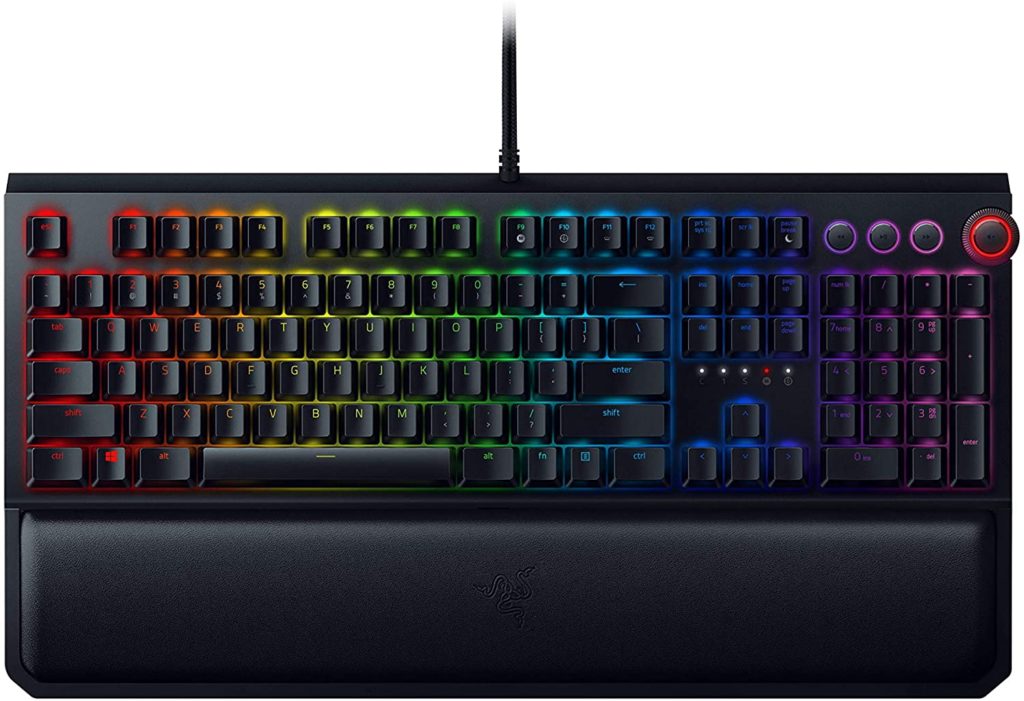
It is a keyboard that is preferred by programmers, gamers, and coders alike. Since its launch in 2010, the keyboard has seen many improvements. Each update has made it better than the earlier one.
The keys produce a click sound with 50G of the actuation force. This makes typing a satisfactory experience. The keyboard comes with programmable macros. The entire arrangement can be reorganized.
The design follows the latest ergonomic principles. It features a palm-rest made of leather. This plush leather cushion makes it easier for programmers and coders to type in long sessions. The keys can sustain up to 80 million clicks. The durability is specially enhanced by the use of the top plate made of military-grade metal.
One additional feature that makes this keyboard more interesting are the headphone ports. The headphone ports are USB pass-through and 3.5 mm in size. Combined with the media control options, the keyboard becomes even more exciting.
Read More
Latest Price on Amazon:
- The #1 Best-Selling Gaming Peripherals Manufacturer in the US: Source - The NPD Group, Inc., U.S. Retail Tracking Service, Gaming Designed: Keyboards, Mice, PC Headsets, and PC Microphones, Based on...
- Signature Mechanical Switch for Gaming: Razer Green switch technology provides a satisfying clicky sound with 50 G of actuation force, ideal for typing and gaming requiring the highest accuracy
- Ultimate Personalization & Gaming Immersion with Razer Chroma: Fully syncs with popular games, Razer hardware, Philips Hue, and gear from 30+ partners; supports 16.8 million colors on individually...
- Fully Programmable Macros: Razer Hypershift allows for all keys and keypress combinations to be remapped to execute complex commands
- Ergonomic, Magnetic Wrist Rest: Made of plush leatherette to maximize comfort over extended gaming sessions
Happy Hacking Professional Keyboard

This is not a traditionally designed keyboard. Yet, it is preferred by large numbers of programmers and coders because of its minimalist design. The keyboard was created to do away with the unnecessary keys on the board. As a result of this effort, the original designer of the keyboard brought the number of keys down to 60.
The design is now compact and sleek. The keycaps are printed on the surface which makes it even more visually appealing. As per the new tenets of minimalist design, the keyboard has all its functions and navigation keys at the top of the keyboard. However, to make the design minimalist and to give it a compact and sleek design, the manufacturers have not tried to reduce the key sizes.
The keys used are a mix of mechanical and membrane keyboards. Typing does not make much sound. The keys that are present on the keyboard are as follows: 26 letter keys, ten digit keys, 11 punctuation keys. The remaining keys are Escape, Tab, CTRL, Shifts, Alts, Return, Function, Delete, and the Spacebar.
The keyboard is compatible with both the Windows PC and the Mac operating system. The set up comes with a cable that 1.8 meters in length. The cable is detachable which adds to the portability quotient of the keyboard.
At its core, the keyboard is a perfect choice for anyone who has to type long texts. The keyboard is also free of the arrow keys. It uses function keys and shortcuts as replacements. The keyboard manufacturers primarily consider the programmers and the coders as their target audience, but the keyboard is non-programmable. The keyboard does not come with custom firmware. It also does not allow any re-assignment of onboard keys.
It’s also true that the keyboard takes some time to get accustomed with. But, once the programmer gets used to it, there is nothing like this minimalist device. The design of the keys is such that the writer’s hands stay on the starting row. It helps in bringing in efficiency and providing comfort. This design also has an ergonomic value which is often the most sought after benefit for programmers and coders.
Read More
Latest Price on Amazon:

- for Professional use Keyboard.
- Ships directly from Japan via Express Mail International
The post Best Keyboards for Programming & Coding first appeared on JUST™ Creative.














![Palm Canyon Drive [Deluxe Edition]](https://justcreative.com/wp-content/uploads/2020/10/Palm-Canyon-Drive-Deluxe-Edition-1024x681.png)