Wednesday, 25 March 2020

Logo File Formats Guide with FREE Cheat Sheet

There’s often a lot of confusion about which files formats you need to give a client when delivering a final logo or branding package. You probably know that you have to give your client a variety of file formats, but which ones?

Clients may frequently contact you asking for strange file formats or ad-hoc logo file requests. Print vendors sometimes use outdated technologies that require old and obscure files. You may wonder what all these file formats are used for and if they are even necessary.

I can say with the confidence of experience — the moment you decide not to provide a file format in your logo package is the moment that your client will send you an annoying email asking you for that exact file. So don’t give them the opportunity to distract or upset your design mojo. Make a logo package that includes all of the file formats described below to cover all of your bases.

Ok, but which file formats and why? I’m getting there, I promise.

Logo File Formats Explained

The issue with many file format explanations is that they get too technical.

They dive deep and discuss things like lossless compression, bit depth, bitmap, raster… the list of jargon goes on. If you’re technically minded and absolutely love reading a lengthy comparison of file types while you kick back on the beach, then those guides are for you, but I think that we can keep this pretty simple-stupid.

If you are unsure about what file types to send your client, this is all you really need to know.

Skip the rest, and simply download the cheat sheet here or read on to learn more.
Creating Logo Files for Designers

Logo Design Files: Who needs what file format?

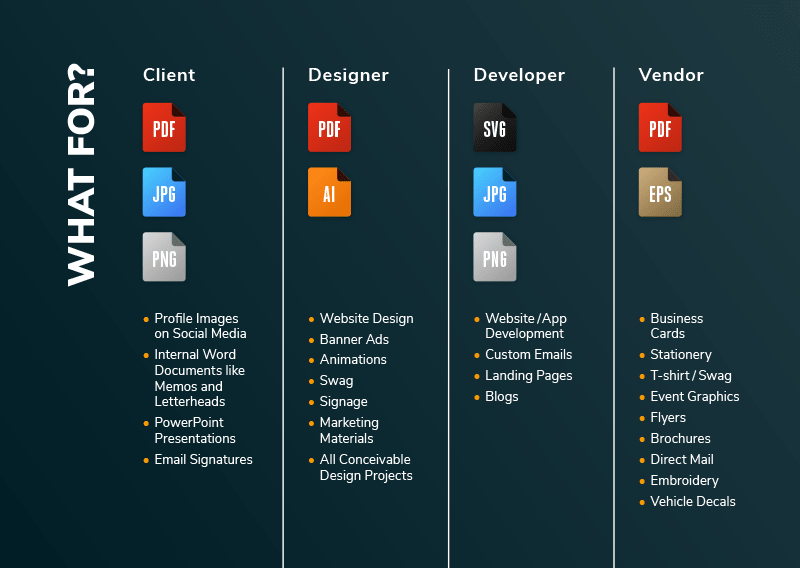
The saying goes, “Different strokes for different folks,” right? Well, there are different file formats for different folks too. Clients don’t often have much use for an illustrator design file, and designers don’t really need JPGs for much. Here’s a breakdown of who uses what:
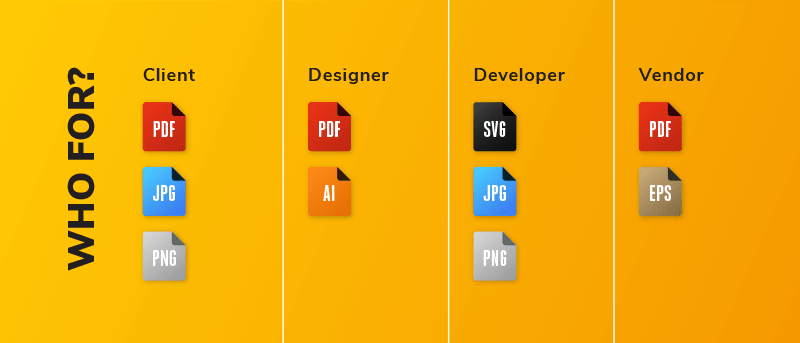
Logo File Cheat Sheet WHO


What is each logo file format for?

Logos end up existing in many different contexts. Sometimes the logo will be a huge vehicle decal. Other times it will be an itty bitty favicon for a website. The parties mentioned above will have different goals for a specific logo file format. Here are some use cases:

  • Client: PDF, JPG PNG – Social Media, Internal Docs, Powerpoint, Email Signatures
  • Designer: PDF, AI – Websites, Marketing Material, Signage, Ads
  • Developer: SVG, JPG, PNG – Websites, Blogs,
  • Vendor: PDF EPS – Printed Materials

Logo File Cheat Sheet Free Download


Vector Logo File Formats Guide

AI Adobe Illustrator Logo File

The AI file is the original, editable working file of the designer. These can not be used as image files online (PNG, JPG or SVGs do this job).

EPS Encapsulated PostScript Logo File

An EPS file is the industry standard vector file format, as it can be used by the widest range of software, including Adobe, Corel and Affinity. It is most likely what a designer will provide to the client.

PDF Logo File

PDFs are similar to EPS files although they can be opened with PDF viewers such as Adobe Acrobat. They can work in most software and retain editing capabilities, although EPS files are more standard.

SVG Scalable Vector Graphics Logo File

SVG files are vector based files that can be used online. They are becoming increasingly more common on websites as they are lighter to download than PNG or JPG files. EPS & PDF file formats do not display online.


Raster Logo File Format Guide

PNG Logo File Format

PNG files are generally used for logos online as they allow for transparency, meaning they can be placed on any coloured background. They also compress well if there are not too many colours.

JPG/JPEG Logo File Format

JPEGS are the most common file seen online as they are optimized for compression, meaning they download quickly because the file size is smaller. Their downfall is lack of transparency.


Where does each logo file format work best?

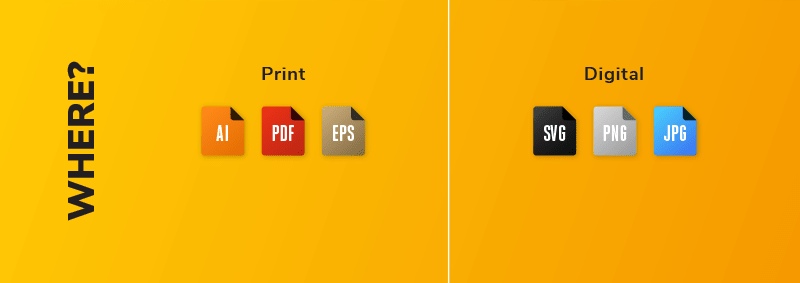
There are really only two environments a logo is ever going to appear in. The logo will either be printed, or it will be rendered digitally. Barring a large sculpture of your magnificent logo design placed somewhere on a global company’s campus — I think print and digital covers it.

The formats in these columns aren’t usually swapped. Web files are small to keep web pages from loading slowly. Formats in the web column simply won’t have the resolution or be compatible with design/printing software for print uses. In contrast, formats in the print column are high resolution and will hog a lot of memory in a digital environment — if they’re even compatible in the first place.

  • Print: AI, PDF, EPS:
  • Digital: SVG, PNG, JPG

Logo File Cheat Sheet WHERE


Why use this logo design file format?

The following is my oh-so-simple breakdown of why each specific filetype is best at its job:
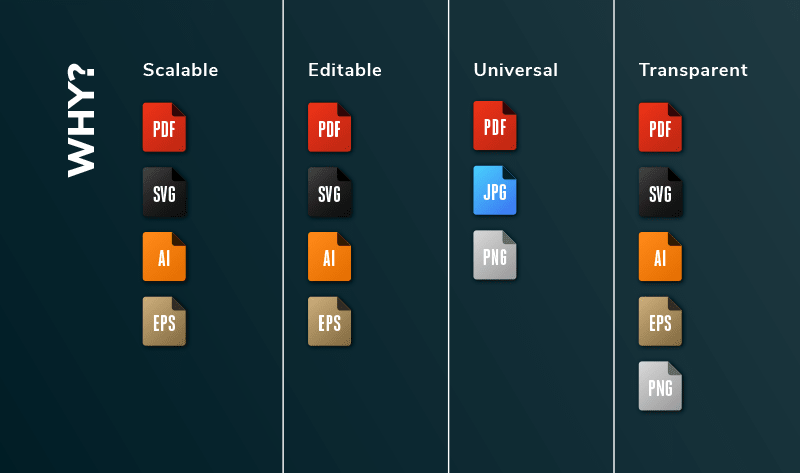
Logo File Cheat Sheet WHY

Scalable – PDF, SVG, AI, EPS

Formats in the scalable column are vector-based. This means they can be scaled without losing resolution. Vector-based logos are great for the variability that can occur between different print projects (think business card vs billboard) or on responsive websites where the logo may need to change sizes for different screens.

Note: formats that aren’t included in the scalable column will lose resolution and become fuzzy when scaled.

Editable – PDF, SVG, AI, EPS

An added benefit of vector-based formats is that they can be edited by design applications. A designer can open up any of the formats in the Editable column and make a change — perhaps they need to add a ®.

Universal – PDF, JPG, PNG

The universal column contains logos that anyone with a computer should be able to open and view. This makes them great for using on the web or sharing.

Transparent – PDF, SVG, AI, EPS, PNG

Transparency simply means that the logo file does not have a background. Formats in the transparent column are great for placing over a solid color, image, or pattern because nothing but the logo will show up in these files. There will be no annoying white box behind the logo.


File formats you DON’T need to send

Lastly, I wanted to share the file formats you should not need to include in your logo package.

PSD

Please do not design logos in Photoshop. Use vector drawing software like Adobe Illustrator or Affinity Designer.

TIFF

This format’s primary benefit is that it can retain layer information. It’s a raster-based format that is too large for the web, and your print formats are already covered. TIFF is redundant and not useful 99% of the time.


Logo File Format Cheat Sheet

Download this file format cheat sheet and make sure you’re using the right file for the job. (Feel free to change the logo!) Share it with your clients so they know what to do with all the beautiful logo files you’ve sent them! 

One of the most time consuming tasks that every logo designer will need to perform is the preparation of logo files. If you plan to provide multiple lockups in a wide range of formats for web and print as detailed above, this task could take a few hours to complete.

But now there’s a faster way to do it… How does 2 minutes sound?


How to Quickly Package Logo Files
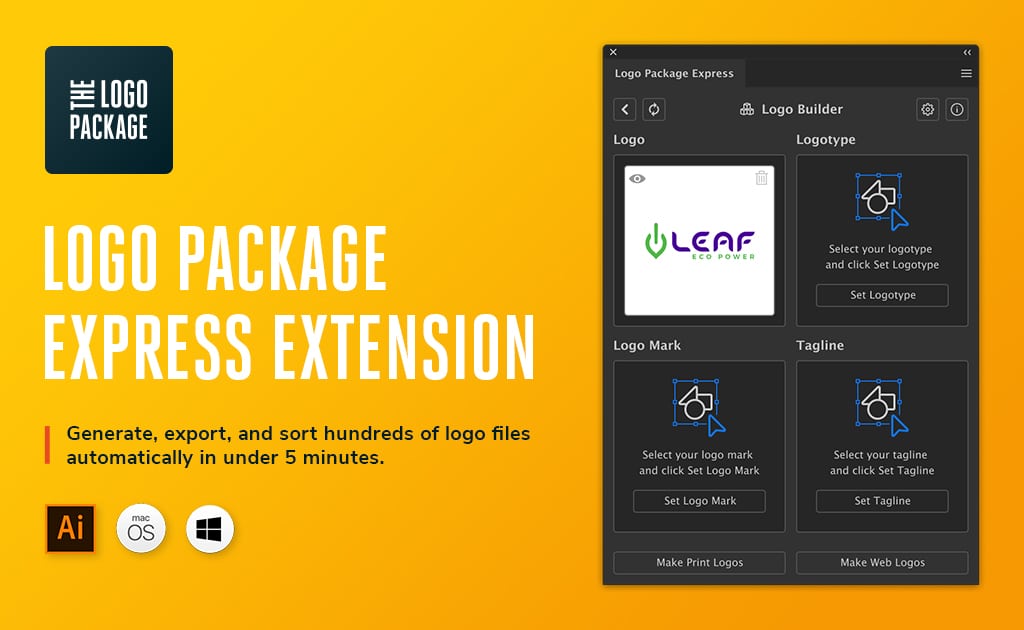
Logo Package Express

As much as I love logo design, I don’t enjoy saving out each individual logo file once the work is approved.

It’s monotonous and takes up way too much time.

» More Info on Logo Package Express! (use second link below to get 20% off)

This awesome extension for Illustrator exports logo files in just one click, conveniently sorting the files into folders and carefully labeling them so you your clients can find exactly what they need.

It’s super fast and a massive time saver and one the best investments you will ever make as a logo designer!

As a Just Creative reader, you can get 20% off ($20) the extension making it $79 instead of $99.

» Click here to get 20% off Logo Package Express!

Enjoy!

Article adapted from blog.thelogopackage.co.

Tuesday, 24 March 2020

Best External Hard Drives in 2020

An external hard drive can be an essential piece of any graphic designers’ toolbox. Having the added option to save your work and the most important files on a secure drive is a great option to have. To that end, we wanted to take another look at the best options out there. So join us won’t you and take another look at the best external hard drives of 2020.

Before we reveal our picks, let’s take a closer look at what you should consider before you buy an external hard drive.


More Top Gear for Designers

View All Buying Guides


What to Consider When Buying an External Hard Drive

Type of Drive

When it comes to external hard drives, there are two options that you can choose from HDD and SSD. Let’s take a closer look at both options:

  • HDD storage is made up of mechanical parts and magnetic tape inside its housing. Typically, they are bulkier units and were the drive of choice before SSD’s were available. While they aren’t as durable as an SSD, they can be more affordable.
  • SSD has no moving parts and uses flash storage to save your files. Because there isn’t a motor in them like in an HDD, the drive uses less power and is faster in comparison. It’s also possible to move the drive without damaging it because there are no moving parts.

Features

As with many different products that you buy, the amount of money that you have to spend and the type of drive you buy can affect the different factors and features that your external hard drive can have.

  • Speed – Not simply concerning the type of interface that the drive uses but also to the rotation speed in HDDs. An SSD is unaffected by this and can vary based on the flash memory or technology being used.
  • Security – Ready-to-use external drives have many different security options that you can choose from. From basic storage to one that includes additional security measures like encryption and even fingerprint reading.
  • Durability – If you’re someone who tends to be a bit clumsy with your tech and let’s face it, we can all be a bit clumsy, you should look for an external drive that can handle a fall or two. Many external hard drives are available with rugged designs and a durable build to withstand some bumps and bruises

The Best External Hard Drives of 2020

Prices are approximate. Live prices are shown below.


Best External Hard Drives in 2020 Compared

Thumbnail
Best Overall
ADATA SE800 1TB IP68 Rugged - Up to 1000 MB/s- SuperSpeed USB 3.2 Gen 2 USB-C External Portable SSD...
Best For Mac Users
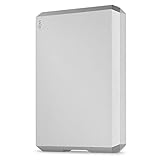
LaCie Mobile Drive 5TB External Hard Drive Portable HDD Moon Silver USB-C USB 3.0, for Mac and PC...
Best For Photographers
WD 2TB My Passport Wireless SSD External Portable Drive, WiFi USB 3.0, Up to 390 MB/s -...
Best For Speed
Samsung X5 Portable SSD 2TB - Thunderbolt 3 External Solid State Drive with NVMe Interface...
Best For Travellers
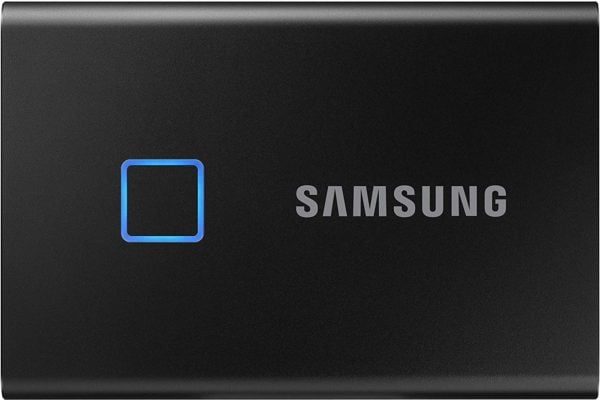
Samsung T7 Touch Portable SSD - 1TB - USB 3.2 (MU-PC1T0K/WW), Black
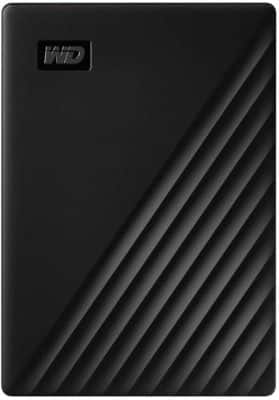
WD 5TB My Passport Portable External Hard Drive, Black - WDBPKJ0050BBK-WESN
Title
ADATA SE800 1TB IP68 Rugged - Up to 1000 MB/s- SuperSpeed USB 3.2 Gen 2 USB-C External Portable SSD...
LaCie Mobile Drive 5TB External Hard Drive Portable HDD Moon Silver USB-C USB 3.0, for Mac and PC...
WD 2TB My Passport Wireless SSD External Portable Drive, WiFi USB 3.0, Up to 390 MB/s -...
Samsung X5 Portable SSD 2TB - Thunderbolt 3 External Solid State Drive with NVMe Interface...
Samsung T7 Touch Portable SSD - 1TB - USB 3.2 (MU-PC1T0K/WW), Black
WD 5TB My Passport Portable External Hard Drive, Black - WDBPKJ0050BBK-WESN
Prime Status
-
Star Rating
Reviews
32 Reviews
366 Reviews
136 Reviews
208 Reviews
54 Reviews
2,414 Reviews
Capacity
1T.B
5TB
2TB
2TB
2TB
5TB
Interface
USB 3.0
USB 3.0
USB 3.0
USB 3.0
USB 3.0
USB 3.0
Price
$159.99
$149.94
$591.75
$699.99
$229.99
$119.97
Best Overall
Thumbnail
ADATA SE800 1TB IP68 Rugged - Up to 1000 MB/s- SuperSpeed USB 3.2 Gen 2 USB-C External Portable SSD...
Title
ADATA SE800 1TB IP68 Rugged - Up to 1000 MB/s- SuperSpeed USB 3.2 Gen 2 USB-C External Portable SSD...
Prime Status
Star Rating
Reviews
32 Reviews
Capacity
1T.B
Interface
USB 3.0
Price
$159.99
Buy Now
Best For Mac Users
Thumbnail
LaCie Mobile Drive 5TB External Hard Drive Portable HDD Moon Silver USB-C USB 3.0, for Mac and PC...
Title
LaCie Mobile Drive 5TB External Hard Drive Portable HDD Moon Silver USB-C USB 3.0, for Mac and PC...
Prime Status
Star Rating
Reviews
366 Reviews
Capacity
5TB
Interface
USB 3.0
Price
$149.94
Buy Now
Best For Photographers
Thumbnail
WD 2TB My Passport Wireless SSD External Portable Drive, WiFi USB 3.0, Up to 390 MB/s -...
Title
WD 2TB My Passport Wireless SSD External Portable Drive, WiFi USB 3.0, Up to 390 MB/s -...
Prime Status
-
Star Rating
Reviews
136 Reviews
Capacity
2TB
Interface
USB 3.0
Price
$591.75
Buy Now
Best For Speed
Thumbnail
Samsung X5 Portable SSD 2TB - Thunderbolt 3 External Solid State Drive with NVMe Interface...
Title
Samsung X5 Portable SSD 2TB - Thunderbolt 3 External Solid State Drive with NVMe Interface...
Prime Status
Star Rating
Reviews
208 Reviews
Capacity
2TB
Interface
USB 3.0
Price
$699.99
Buy Now
Best For Travellers
Thumbnail
Samsung T7 Touch Portable SSD - 1TB - USB 3.2 (MU-PC1T0K/WW), Black
Title
Samsung T7 Touch Portable SSD - 1TB - USB 3.2 (MU-PC1T0K/WW), Black
Prime Status
Star Rating
Reviews
54 Reviews
Capacity
2TB
Interface
USB 3.0
Price
$229.99
Buy Now
Thumbnail
WD 5TB My Passport Portable External Hard Drive, Black - WDBPKJ0050BBK-WESN
Title
WD 5TB My Passport Portable External Hard Drive, Black - WDBPKJ0050BBK-WESN
Prime Status
Star Rating
Reviews
2,414 Reviews
Capacity
5TB
Interface
USB 3.0
Price
$119.97
Buy Now


ADATA SE800

ADATA SE800

The Best External Hard Drive Overall

Capacity: 1TB | Interface: USB 3.0

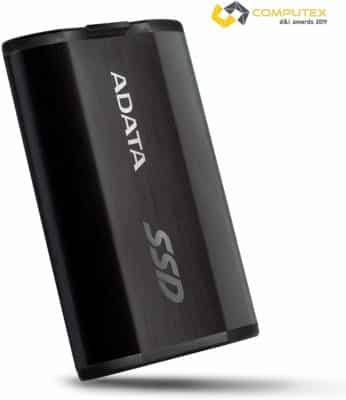
Finding the perfect external hard drive that fits all of your needs can be a constant struggle but the SE800 from ADATA looks to be about as close as you can get with its highly durable design that is small, light and performs fast. Included with the drive are cables from USB-C and USB-A even though they do tend to be a little short, it’s a minor complaint from a shirt-pocket-sized drive that can be an excellent addition to your kit

Learn More – $159


Latest Price on Amazon:

Sale
ADATA SE800 1TB IP68 Rugged - Up to 1000 MB/s- SuperSpeed USB 3.2 Gen 2 USB-C External Portable SSD...
32 Reviews
ADATA SE800 1TB IP68 Rugged - Up to 1000 MB/s- SuperSpeed USB 3.2 Gen 2 USB-C External Portable SSD...
  • Superfast Read/Write Speed up to 1000 MB/s
  • IP68 Rated: Ruggedized Waterproof / Dust-proof / Drop-Proof / Shock-resistant
  • Exquisite hairline-brushed surface for sleek look, compact and lightweight it's perfect for travelling
  • Interface: USB 3. 2 Gen 2 Type-C, backward compatible with USB 2. 0
  • Limited 3 Year Manufacturer


LaCie Mobile Drive

LaCie Mobile Drive

Best for Mac Users

Capacity: 5TB | Interface: USB 3.0

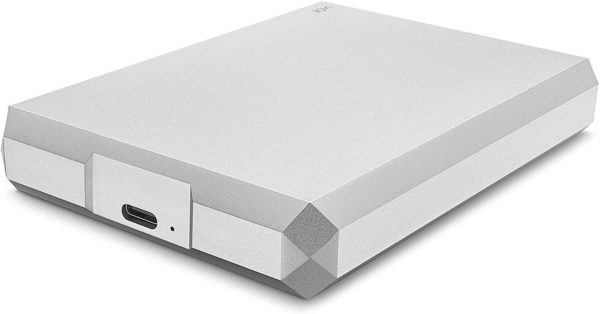
Many people who own either a MacBook or even an iMac, tout the design and overall look as reasons why they gravitate towards the brand and many of the accessories that they buy for their computer match that design, such as the LaCie Mobile Device. With its all-metal enclosure, the drive will look right at home next to any Apple product and perform just as well. Packed with a toolkit from LaCie that can easily handle backups, restores and mirroring, although it does require a download first. It can also be a bit hefty but for the amount of storage at a fair price, you can’t go wrong.

Learn More – $149


Latest Price on Amazon:

Sale
LaCie Mobile Drive 5TB External Hard Drive Portable HDD Moon Silver USB-C USB 3.0, for Mac and PC...
366 Reviews
LaCie Mobile Drive 5TB External Hard Drive Portable HDD Moon Silver USB-C USB 3.0, for Mac and PC...
  • Enjoy 5TB of enormous capacity for photos, playlists, docs, and more
  • Use seamlessly with Mac, Windows, USB C, and USB 3.0
  • Back up files with a single click or schedule automatic backups
  • Turn footage into flawless productions with one free month of Adobe Creative Cloud All Apps Plan
  • Enjoy long term peace of mind with the included two year limited warranty


Samsung Portable SSD T7 Touch

Samsung Portable SSD T7 Touch

Best for Security-Conscious Travelers

Capacity: 2TB | Interface: USB 3.0

When you travel a lot, it can be easy to lose some things during travel and if you have sensitive data, you want to make sure it’s secure. The SSD T7 Touch from Samsung, a credit-card-sized SSD comes with a built-in fingerprint reader as well as an LED status indicator and offers fast and versatile performance every time you use it. Available in capacities up to 2TB, the drive gives you a great way to protect your files, even if it is a little on the expensive side.

Learn More – $229


Latest Price on Amazon:

Samsung T7 Touch Portable SSD - 1TB - USB 3.2 (MU-PC1T0K/WW), Black
54 Reviews
Samsung T7 Touch Portable SSD - 1TB - USB 3.2 (MU-PC1T0K/WW), Black
  • SSD with fingerprint and password security
  • Transfers files nearly 9. 5x faster than hard drives
  • Reads up to 1, 050 MB/s / Writes up to 1, 000 MB/s
  • LED status indicator
  • Shock-resistant and withstands drops from 6ft


Seagate Backup Plus Ultra Touch

Seagate Backup Plus Ultra Touch

Best for General-Use Storage

Capacity: 2TB | Interface: USB 3.0

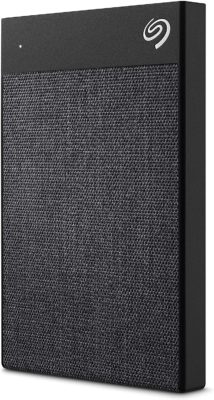
Even with all the flashy bells and whistles that many other drives can come with, sometimes a basic, secure drive is all you need. The Ultra Touch drive from Seagate is a small and light drive that protects your data with a password and AES-256 hardware encryption, providing you with the security you’re looking for. A Seagate Toolkit is available via download to handle backups and recovery as well as mirroring. While the fabric-covered enclosure is nice, it can make it a bit slippery when you grab it.

Learn More – $69


Latest Price on Amazon:

Seagate Backup Plus Ultra Touch 2TB External Hard Drive Portable HDD Black USB-C USB 3.0, 1yr Mylio...
224 Reviews
Seagate Backup Plus Ultra Touch 2TB External Hard Drive Portable HDD Black USB-C USB 3.0, 1yr Mylio...
  • Safely and easily manage 2TB of photos, videos, movies, and more with hardware encrypted password protection
  • Stylish tone on tone fabric design works seamlessly with USB C and USB 3.0 laptops and PCs
  • The perfect external hard drive for Mac or Windows, simply back up files with a single click or schedule automatic daily, weekly, or monthly backups. Reformatting may be required for use with Time...
  • Edit, manage, and share photos with a 1 year complimentary subscription to Mylio Create and a 2 month membership to Adobe Creative Cloud Photography Plan
  • Enjoy long term peace of mind with the included 2 year limited warranty


WD My Passport

WD My Passport

The best external hard drive for media

Capacity: 5TB | Interface: USB 3.0

Most people who shop around for an external hard drive will know the name Western Digital or WD for short. With their My Passport line, they offer small and light options for all of your needs and with a capacity up to 5TB, you can store all of your files, photos, and videos with ease. Packed with AES-256 hardware encryption plus password protection, the drive comes with apps for checking drive health, reformatting, and even backups and restoring information. The combination of storage and apps makes this drive one to consider even as a backup.

Learn More – $123


Latest Price on Amazon:

Sale
WD 5TB My Passport Portable External Hard Drive, Black - WDBPKJ0050BBK-WESN
2,414 Reviews
WD 5TB My Passport Portable External Hard Drive, Black - WDBPKJ0050BBK-WESN
  • Automatic backup Easy to use
  • Password Protection + 256 bit AES hardware encryption
  • Western Digital Discovery Software for Western Digital backup, password Protection and drive management
  • Superspeed USB port; USB 2.0 compatible
  • 3 year manufacturer's limited warranty


G-Techno ArmorATD

G-Techno ArmorATD

Best for On-the-Go Users

Capacity: 5TB | Interface: USB 3.0

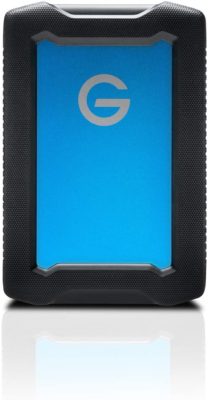
When you’re on the go and need an external hard drive, many of the options out there either don’t have the capacity you need or is so fragile that you break one every month. The ArmorATD from G-Techno comes with a protective bumper all around that you can remove when you need to. While the design gives it a rugged appeal, the drive doesn’t come with an activity light, backup utilities or photo/video subscriptions but with the capacity offered at an affordable price makes this a great option.

Learn More – $69


Latest Price on Amazon:

Sale
G-Technology 1TB ArmorATD All-Terrain Rugged Portable External Hard Drive - USB-C, Thunderbolt 3,...
192 Reviews
G-Technology 1TB ArmorATD All-Terrain Rugged Portable External Hard Drive - USB-C, Thunderbolt 3,...
  • Triple-layer shock resistance for added durability
  • Rain-and dust-resistant (IP54) enclosure with a 1000lb crush rating
  • With capacities up to 4TB* of storage for your photos and footage
  • USB-C ready; USB-3.0 and Thunderbolt 3 compatible
  • Ready to go with mac and Windows


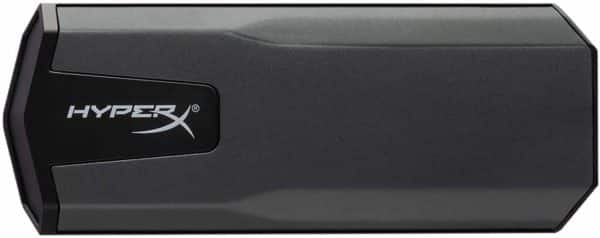
HyperX Savage EXO

HyperX Savage EXO

The Most Versatile Storage Option

Capacity: 960GB | Interface: USB 3.0

With its sleek, lightweight, no-snag design, the Savage EXO from HyperX comes with bundled cables so that you can connect the drive through USB Type-A and Type-C connections. The SSD is easy to carry and won’t take up a lot of real estate on your desk. While there are no utility or photo/video subscriptions included, the equally useful drive for both PC backups and console-game supplemental storage when you’re playing on your downtime is very easy on your wallet compared to other options out there.

Learn More – $153


Latest Price on Amazon:

HyperX Savage Exo 960GB Compact External ssd USB-C, USB 3.1 SHSX100/960G - Photo, Video, Gaming...
49 Reviews
HyperX Savage Exo 960GB Compact External ssd USB-C, USB 3.1 SHSX100/960G - Photo, Video, Gaming...
  • Lightning-quick transfer speeds
  • Simple connectivity for Windows and Mac
  • Compatible with Xbox One and PS4 via USB 3. 1 Gen 2
  • Light, portable, and compact


LaCie 2big RAID

LaCie 2big RAID

For Those Who Need Extreme Storage

Capacity: 16TB | Interface: USB 3.0

Graphic designers and other creatives regularly handle large amounts of data. This can require an incredible amount of storage space. The LaCie 2big RAID comes with a whopping 16TB of storage with two hot-swappable, high-capacity drives that come with a wide variety of settings that allow you to use the drive with maximum flexibility and complete data protection.

Learn More  – $649


Latest Price on Amazon:

LaCie 2big RAID 16TB External Hard Drive Desktop HDD Thunderbolt 3 USB-C USB 3.0 7200 RPM...
16 Reviews
LaCie 2big RAID 16TB External Hard Drive Desktop HDD Thunderbolt 3 USB-C USB 3.0 7200 RPM...
  • Ideal for photographers, indie filmmakers, and YouTubers, 2big RAID is an external desktop storage solution offering up to 16TB of massive space and powerful speeds of up to 440MB/s
  • Enjoy seamless compatibility with USB C and USB 3.0 computers
  • Easily configure RAID 0/1 using the step by step wizard to optimize the system for performance or redundancy
  • Equipped with hot swappable IronWolf Pro enterprise class drives for ultimate reliability and performance
  • Enjoy long term peace of mind with the included 5 year limited warranty including Rescue Data Recovery Services


Samsung Portable SSD X5

Samsung Portable SSD X5

For Creators Who Crave Extreme Speed

Capacity: 2TB | Interface: USB 3.0

The Portable SSD X5 from Samsung is one of the fastest single-drive external hard drives available thanks to its Thunderbolt 3 and PCIe NVMe interfaces. With multiple capacity options and a sleek design, the drive is great for anyone looking for speed. However, with no USB support, difficulty connecting to Windows PCs, and a high price the SSD X5 may be better suited for someone who does creative work on a higher-end Mac.

Learn More  – $699


Latest Price on Amazon:

Samsung X5 Portable SSD 2TB - Thunderbolt 3 External Solid State Drive with NVMe Interface...
208 Reviews
Samsung X5 Portable SSD 2TB - Thunderbolt 3 External Solid State Drive with NVMe Interface...
  • THUNDERBOLT 3 AND NVMe POWER: First ever NVMe-based portable SSD from Samsung featuring Thunderbolt 3 technology, the X5 delivers up to 40Gb/s data transfer speeds
  • LIGHTNING FAST READ WRITE SPEEDS: Sequential read and write performance levels of up to 2,800MB/s and 2,300MB/s, respectively
  • DURABLE DESIGN: Full metal body with glossy top and non-slip bottom mat withstands drops of up to 2 meters; Shock resistant internal design features Dynamic Thermal Guard technology to help maintain...
  • SECURE ENCRYPTION: Optional password protection and AES 256-bit hardware encryption keeps your personal and private data more secure
  • WARRANTY AND COMPATIBILITY: 3-year limited warranty; Ensure to have the latest firmware/bios installed for the device and the computer


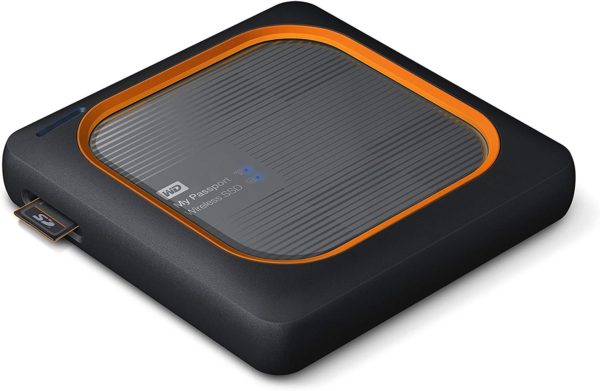
Western Digital My Passport Wireless SSD

Western Digital My Passport Wireless SSD

Best External Hard Drive for Photographers

Capacity: 2TB | Interface: USB 3.0

If you’re a photographer out in the wild, it can be tough to find a hard drive that can keep up with your career. Thankfully the My Passport Wireless SSD from Western Digital comes with a design that is durable enough to handle the roughest terrain and even doubles as a power bank. With a built-in SD card reader and USB port, the drive is very versatile and can do much more than just transfer files. With the drive not having any Thunderbolt support and it being rather expensive, it may keep some users away but those who take a chance will find a great drive worth the price.

Learn More – $591


Latest Price on Amazon:

Sale
WD 2TB My Passport Wireless SSD External Portable Drive, WiFi USB 3.0, Up to 390 MB/s -...
136 Reviews
WD 2TB My Passport Wireless SSD External Portable Drive, WiFi USB 3.0, Up to 390 MB/s -...
  • Built-in SD card reader with one-touch copy button
  • Durable, shock-resistant SSD inside
  • All-day battery (up to 10 hours)* |*Based on streaming HD 720p, 3 Mbps video to one device over Wi-Fi 2.4 GHz single band only. Actual battery life depends on file size, type, format, bitrate, devices...
  • Wirelessly stream 4K videos and view photos with the My Cloud mobile app
  • Import from USB card readers


The Best External Hard Drives of 2020

Choosing the right external hard drive can help make your work easier and help you succeed. With our list of the best external hard drives in 2020, we hope that by choosing the right hard drive for your needs, you can not only get your work done but also grow your business and make 2020 your best year ever.