Wednesday, 16 January 2019

Top 15 Font Combinations for 2019

Often as designers we are faced with the challenge of selecting fonts that work well together. 

Which is why we’ve compiled this list of the top 15 font combinations for 2019.

These fonts are all available for free on Google Fonts.

Want to see these combinations in use? Check out the new Font Combination Tool which utilizes 170 main Google fonts with multiple matching font combinations, displayed in a neat “web-page” format.

Related Posts:

The Top 15 Professional Font Combinations for 2019

What fonts all work well together? We’ve taken the guess work out for you, with these tried & true font pairs.

Get inspired with these font pairings for 2019!

  1. Playfair Display with Source Sans Pro
  2. Merriweather with Oswald
  3. Montserrat with Merriweather
  4. Raleway with Lato
  5. Elsie with Roboto
  6. Dancing Script with Josefin Sans
  7. Abril Fatface with Roboto
  8. Corben with Nobile
  9. Spirax with Open Sans
  10. Wendy One with Lato
  11. Baloo with Montserrat
  12. Cherry Cream Soda with Raleway
  13. Amaranth with Open Sans
  14. Palanquin with Roboto
  15. Sansita with Open Sans

  1. Playfair Display with Source Sans Pro

Font Combination Playfair Display & Source Sans

Playfair Display was designed by Claus Eggers Sorense, and is a Traditional Style font. We believe that it works very well with Source Sans Pro, a simpler font style. People are going back to the more traditional styles of fonts, because they look elegant and give a feeling of excellence.

  1. Merriweather with Oswald

Font Combination Merriweather & Oswald

This font is very easy to read, and can be altered easily for width and height. With the use of its serifs and legible text, it’s sure to be a top font for the new year. Complemented with Oswald, a Sans Serif font. 

  1. Montserrat with Merriweather

Font Combination Montserrat & Merriweather

Designed by Julieta Ulanovsky, Montserrat is a modern, streamlined and legible font, because it’s a Sans Serif it’s good to pair with a serif font like Merriweather.

  1. Raleway with Lato

Font Combination Raleway and Lato

A simple yet stylish sans-serif font, Raleway can be used for many different design styles, making it a versatile font to select. We have chosen to pair it with Lato, which is also a sans-serif font, however, by using it as smaller and thinner text it compliments the header text perfectly.

  1. Elsie with Roboto

Font Combination Elsie & Roboto

This is a beautiful font, it was created to celebrate the world of women and with it’s flowing edges and serifs it is very elegant. It’s such a detailed font it needs to be paired with something very simple. This is why a font such as Roboto is perfect, it doesn’t detract away from the style of the header font.

  1. Dancing Script with Josefin Sans

Font Combination Dancing Script & Josefin Sans

Just as the name suggests, this script font is flowing and creative. Most script fonts really need a to be paired with a simple font, so they don’t overrun the seed font.

  1. Abril Fatface with Roboto

Font Combination - Abril Fatface and Roboto

A very unique and interesting font style, with its Didone style serifs and bold lettering, Abril FatFace really grabs your attention. When pairing it, you must have something subtle and clean like Roboto, which is a sans serif style font.

  1. Corben with Nobile

Font Combination Corben Nobile

A modern and stylish font, with many curves, Corben is a bold stand out from the crowd, reminiscent of Cooper Black. Due to it’s heavy font weight, it must be paired with a simple font, such as Nobile.

  1. Spirax with Open Sans

Font Combination Spiriax and Open Sans

A unique font that gives the sense of whimsical mystery and storytelling. Designed by Branda Gallo, it works beautifully well with a simple san serif font, like Open Sans.

  1. Wendy One with Lato

Font Combination Wendy and Lato

A bold, quirky, eye catching font, designed by Alejandro Inler. It is modern in appearance and needs to be paired with a slim font, like Lato.

  1. Baloo with Montserrat

Baloo & Montserrat Font Combination

Designed by Ek Type, Baloo is a bubbly, rounded font, and works well with a simple font like Montserrat, due to it’s lighter weight.

  1. Cherry Cream Soda with Raleway

A creative font, designed by Font Diner, it inspires memories of the 1950’s soda craze. It’s a unique style, that must be paired with a simple font like Raleway, with it’s clear straight lines.

  1. Amaranth with Open Sans

Amaranth & Open Sans Font Combination

This font creates interest, because it’s not just a simple straight font. It has slight curves that make the lettering eye-catching. It could be used for many different applications in design, and should be paired with a sans serif font, like Open Sans.

  1. Palanquin with Roboto

Font Combination Palanquin & Roboto

A very versatile font, it can be used with many different weights and heights, and still looks amazing. Designed by Pria Ravichandran,  it can be paired with something similar, like Roboto.

  1. Sansita with Open Sans

Font Combination Sansita Open Sans

A wavy, stylish font, created by Omnibus-Type, with a variety of sizing options available. It is easily paired with a sans serif font, like Open Sans.


UNLIMITED DOWNLOADS: 400,000+ Fonts & Design Assets

All the Fonts you need and many other design elements, are available for a monthly subscription by subscribing to Envato Elements. The subscription costs $29 per month and gives you unlimited access to a massive and growing library of 400,000+ items that can be downloaded as often as you need (stock photos too)!

Wednesday, 2 January 2019

The Best Laptops for Graphic Designers 2019

This article was contributed by DesignBold.

Graphic design is a challenging job that requires serious hardware and software. In the current digital nomad haze, laptop characteristics such as mobility and weight have also become extremely important. As with every profession, the laptop choice is always a subtle game of balance between performance and weight, large screen and portability, maximum features and affordable price.

Luckily, laptop providers produce products for different categories and professions. In this article, we’ll provide a general buying advice on how to choose the perfect laptop and list some of the best laptops for graphic designers on the market in 2018 and 2019. Keep in mind that for simple social media graphics you don’t need impressive hardware power and online graphic design tools can run effectively on any computer.

Need more power or a bigger screen? See here for the best desktop computers for graphic designers.

As 2019 progresses, we will endeavor to update this list.

Related posts:

Best Laptop for Graphic Design 2018

What factors define the best laptops for graphic designers?

Performance

Laptop performance and speed are the sum of three parts: processor, RAM and Storage Drive.

The processor is an integral part of a laptop that ensures that multiple open applications can run smoothly. There are numerous processors to choose from but here are the most suitable ones for graphic design related projects: Core i5, Core i7, AMD Ryzen and Intel Xeon.

RAM aka Random Access Memory is a hardware that stores data inside the computer. RAM stores data temporarily so, when you switch off the computer, all RAM data gets lost. RAM allows the processor to process more data, which can dramatically improve laptop performance.

Storage Drive or Hard Drive – unlike RAM, Storage Drive can store information permanently. SSD can ensure super-fast boot and wake time and better processor performance.

Screen

Perhaps, the most important part of a laptop selection process is choosing the right screen. A screen with higher resolution would mean better details and color accuracy. The size of a screen matters too. A larger screen makes tinkering with the design a lot easier. A 15-inch screen size is a golden standard in the graphic design world.

Keyboard and touchscreen

Graphic designers rarely do design only. They usually work in a team or with clients. So a convenient keyboard is a must. You don’t want to keep missing the keys and spend hours on editing your emails. Additionally, designers often use keyboard shortcuts so proper placement of keys and ergonomic design can be critical for your work speed.

Looking to buy a laptop with a touchscreen? There is no universal approach among designers when it comes to touchscreens. Some love them as they provide a quick and easy way to zoom in and out, others hate the touchscreens since they don’t add much to the experience. But, certainly, after some time, you get used to the touchscreen and it ceases to be a nuisance.

Battery Life

Most graphic designers love novelty, as it brings inspiration and new ideas. You probably have a favorite workspace, but also venture out to coffee shops or co-working spaces. The absence of plugs at your favorite coffee shop can sometimes be frustrating. But with a good battery, you can take your laptop wherever you go and get the work done, all the while enjoying the digital nomad freedom. 12-14 hours of battery life will get you as far as across the Atlantic and through a long productive day.

What is the best laptop for graphic design?

These are the top 8 best laptops for graphic design in 2018.

  1. Apple Macbook Pro
  2. Microsoft Surface Book 2
  3. Dell XPS 15
  4. Acer Predator or Aspire
  5. Lenovo Flex 5
  6. Asus ROG Strix SCAR II
  7. HP ZBook Studio G5
  8. Dell Inspirion 13.3″


1. Apple Macbook Pro

Apple Macbook Pro

If you are a creative you need to appear as such. Right? Personal brand image and operating system are the two main reasons why graphic designers choose Apple products. But the Apple MacBook Pro is also a powerful machine with its Intel i7 Quad Core processor and 16GB of RAM. However, this laptop is not for everyone. If you’re an avid Windows user, it will take some time for you to get used to the new system.

This laptop also doesn’t have any USB ports, which creatives might find uncomfortable. But for the outstanding design experience that Apple offers, and the courage to push its user base towards innovation and technology, the Apple MacBook Pro certainly deserves an ovation. Graphic designers will find AMD Radeon Pro Graphics and the high-resolution screen a pleasure to work with. The only drawback of this laptop is it’s a hefty price. See here for a list of expert recommendations.

Learn More

($2299+)

2. Microsoft Surface Book 2

Microsoft Surface 2

The Surface book screen is smaller but the performance metrics of this laptop are on par with MacBook Pro. The laptop runs on Core i7 processor and with a screen resolution of 3000 x 2000, it’s the best laptop screen for sketching and creating graphics. The Surface Book is highly portable and can easily be transformed into a tablet. Add a touchscreen and the included stylus and you’ll get a laptop that is perfect for creatives who hate to overwork their fingers. It comes in 13.5 and 15″. To save some more cash you can go with the earlier Microsoft Surface models.

Learn More

($819-$1600+)

3. Dell XPS 15

Dell XPS

Dell has always been known for producing reliable bargain machines. But it has recently entered the graphic design space with a powerful and still affordable product. The Dell XPS 15 features a 15.6 inch display, runs on Core i7 CPU and has 16GB of RAM.

Dell might look too business-like for a designer’s taste but it delivers one of the best performances on the market. There are plenty of ports including an HDMI, two USBs, a Thunderbolt, and an SD card reader. Couple it with 512GB SSD and an amazing graphics card and you have a high performing laptop for a sweet price.

Jacob did an in-depth review in 2016 about the differences between the Dell XPS 13 Vs Macbook Pro. Also see number 8 on our list for a lighter, smaller, more affordable option.

Learn More

($1429-$1738)

4. Acer Predator or Acer Aspire

Predator Laptop

This laptop is classified as a Gaming Laptop, meaning it was created to process high-level graphics. As a graphic designer, the way your laptop displays graphics has a direct influence on the quality of your work. So it makes sense to look into Gaming Laptops. This one is equipped with Intel Core i7 processor, 16GB RAM and NVIDIA GeForce GTX 1060.

Depending on your graphic design needs, the laptop comes in two sizes: the 17.3’’ and 15.6’’ screen size versions. The larger screen size version weighs 9.26 pounds, while the smaller size version weighs 8.16 pounds.

Learn More

($1049)

You could also consider their Acer Aspire 15″ which has similar specs at a cheaper price tag ($599), and a more business professional look.

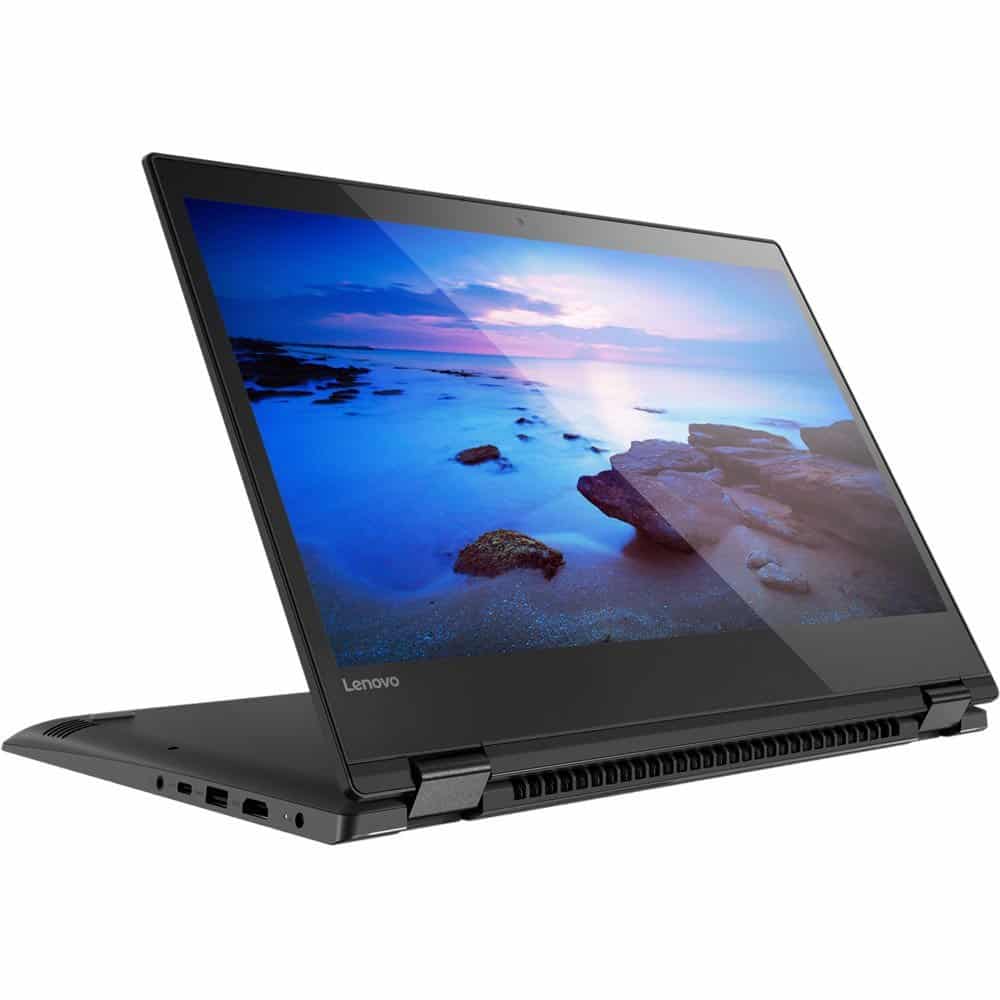
5. Lenovo Flex 5

Lenovo Flex

Another laptop that combines reasonable price and outstanding quality, the Lenovo Flex 5 is equipped with a 14-inch screen, features a Intel Core i5 and possesses 8GB of RAM with 256GB of space which can be upgraded. While this laptop might not run as smoothly as MacBook Pro or Microsoft Surface Book, it still offers a great graphic design experience at a fraction of the price.

If you’re just starting in graphic design and don’t have much of a budget, this laptop is a perfect choice. Its performance is good enough for graphic design purposes and its screen display is of top-notch quality. You might find the touchpad too sensitive, but this can easily be solved with the help of an external mouse.

Learn More

($579)

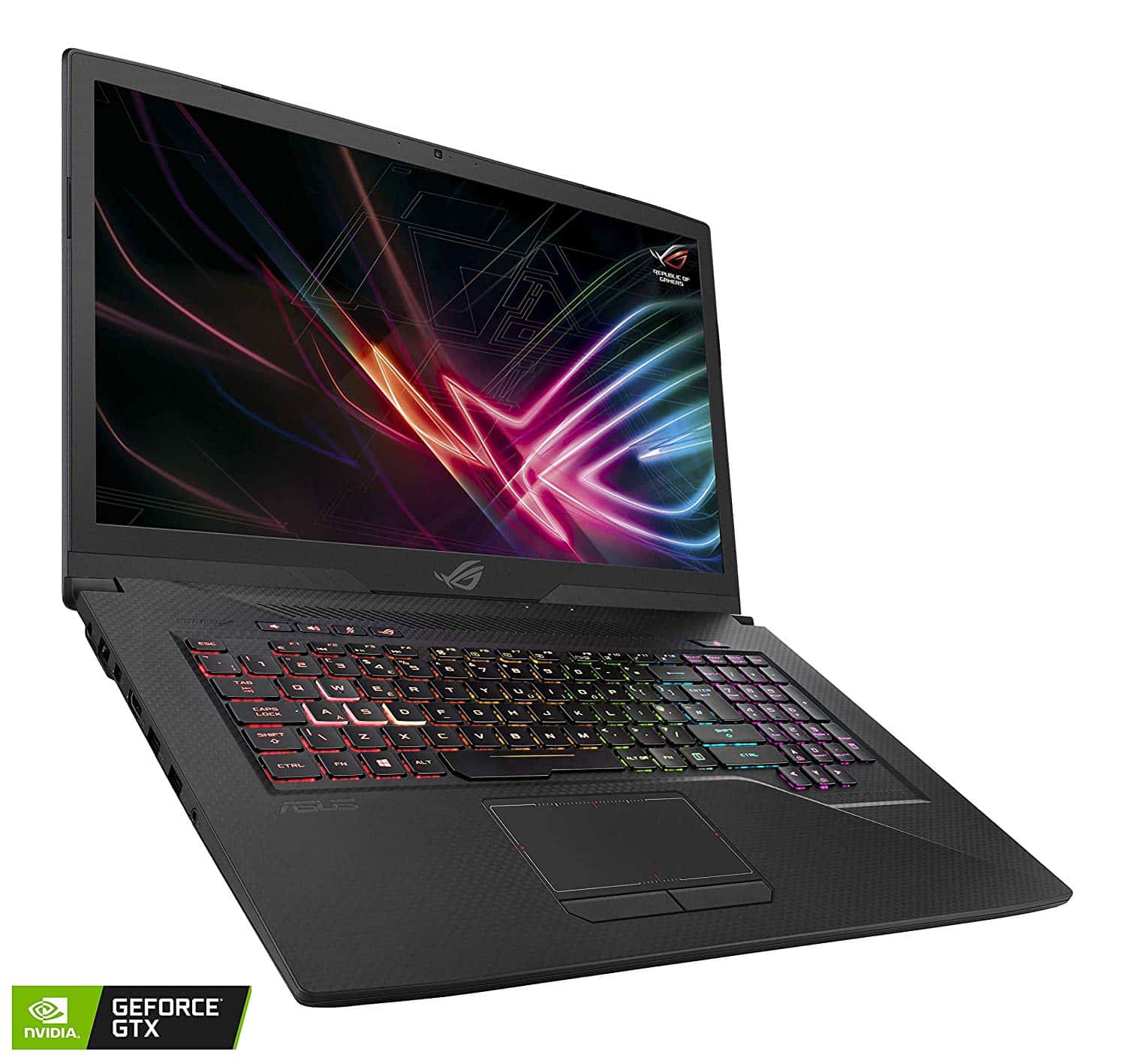
6. Asus ROG Strix SCAR II

Asus Laptop

If you’re looking for a laptop with a unique design, then Asus ROG Strix SCAR II Gaming Laptop is your best bet. The laptop has ambient lighting and a techy feel. The laptop is also packed with high performance hardware such as a Core i7 processor, 16GB RAM, and NVIDIA GeForce GTX.

The battery life of this laptop is slightly over 2 hours, but for such an affordable price it’s a great laptop, that can become a hero at the meetings and showcase your work in the best light.

Learn More

($1999)

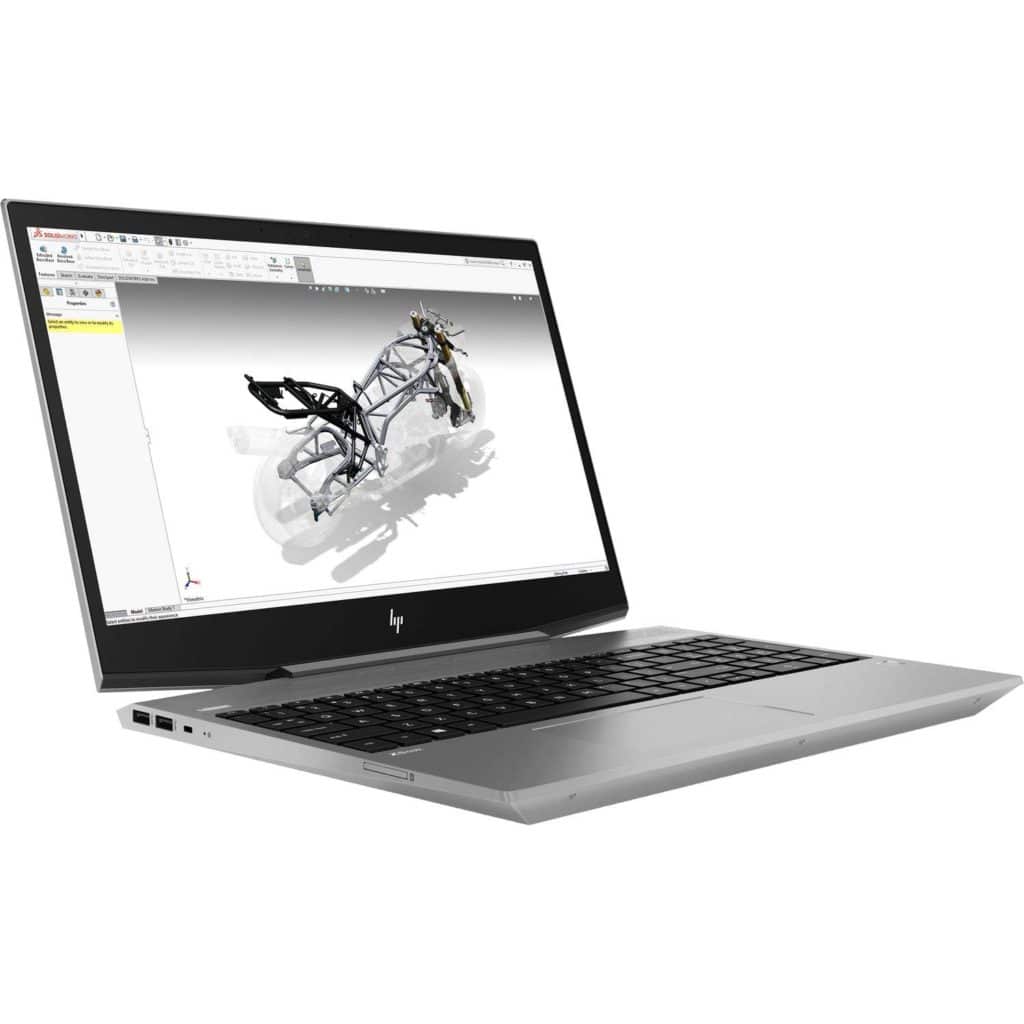
7. HP ZBook Studio G5 Ultrabook Mobile Workstation

HP ZBook g5 laptop

The company classifies this laptop as a “mobile workstation”. It’s equipped with an 8th Generation Intel i7 Core with 32GB RAM and a NVIDIA Quadro P600 graphics card. It’s one the most powerful machines on the market. Some designers might find the production capabilities of this laptop a little over the top, but for those who are dealing with 3D graphics, HP ZBook Studio G5 provides a super fast work experience without taking all the valuable space on your office desk.

Learn More

($1939)

8. Dell Inspirion 13.3″

Dell Inspiron

For designers that travel a lot, a smaller, lighter laptop is ideal. Introducing the 2018 Dell Inspiron 13 which has a flexible 13.3″ touch display, an Intel Core i7-8550U Quad-Core CPU and 8GB memory. This is the perfect balance of performance and portability.

Learn More

($723)

So what is the best laptop for graphic designers in 2018?

Graphic designers tend to have a specific list of requirements for laptops. But rarely can you tick all the boxes from the list. More likely, you’ll spend hours researching all the different options and trying to find the best price-features combination.

The Apple MacBook Pro still remains the #1 preferred option for many designers due to its stunning design and top performance. But other brands are also catching up with high performance offers, that are no less pleasing to the eyes.

Related posts:

This post was contributed by the DesignBold team. DesignBold is an online graphic design tool that aims to redefine the boundaries of design and technology, empowering all users and organizations to share their visions, products and services.

10 Best Earphones for Music Lovers in 2019

The right earphones can make all of your music sound its absolute best and with the advancements in technology, they can do so much more. But choosing the best headphones for your needs can be a bit challenging with all the options out there, in all different price ranges.

So we’ve taken a closer look at what you should look for when searching out the best earphones in 2019 and also provide you with what our top choices are, so you can have a better idea when you go shopping.

We look at the best in-ear earphones and the best wireless earphones for music lovers in 2019, including the best earbuds for iPhone, and in all budget ranges.

If you’re ready, let’s get started.

Types of earphones / earbuds

When you first head online or to the store, it can be a little bit overwhelming seeing the different options out there for the first time. To give you a primer of sorts, we thought it would be a good idea to highlight each of the different types out there to make them easier to spot as well and easier to choose. 

In-Ear Earphones

Also known as earbuds, are typically found in two different variations, ones that sit on the ear while the earphones rest comfortably in the ear, and those that are pushed into the ear. Regardless of the design you choose, both can have issues. The first can become painful especially if they don’t fit right in your ear cavity or if it puts too much pressure on your ear itself.

The second kind can get to be uncomfortable if the earbud doesn’t fit right and can fall out if it’s too big or small. Many people tend to prefer the second kind because of its noise-cancelling design but noise cancelling earbuds can be dangerous if you tend to wear them while you are commuting. You want to make sure that while you can hear what you are listening to in high-quality audio, you can still hear some sound outside in order to stay safe.

On-Ear Earphones

Commonly called headphones because of the headband, on-ear earphones are available in two different options, either pressed against your ear or over-ear headphones that enclose the ear. While the ones pressed against your head are typically more lightweight the over-ear variety, they are relatively cheaper as well. Over-ear headphones can be either light or heavy-weighted so you may want to try them on if you can prior to buying them to determine if the weight is right for you so it doesn’t cause any neck strain while you’re using them.

Wireless earphones

Many different styles of earphones are available with the option to be used wirelessly but this option does tend to add more in terms of the price you will pay. For some, owning wireless headphones is the best option available, especially if you are using them with a portable device or tend to listen to music or other programs while exercising. While the convenience of not having wires is positive, some wireless headphones will end up providing lesser sound quality than what you may be looking for.

How to choose the best earphones for you 

With the different types of earphones available, once you decide on which style you think will work best for your day in and day out, you want to make sure that they also meet certain criteria so they will fit, perform well and last for years to come. With that in mind, we wanted to share out checklist when it comes to choosing the best earphones.

Comfort and fit

The right amount of comfort is important in anything you wear on your body. From jeans to earphones, something worn sparingly won’t generally become uncomfortable. However, over time, without the proper fit, can become really uncomfortable. To get an idea of whether or not the earphones you’re buying are not only a good fit, but comfortable, if you have the chance, try the earphones on for about 20 minutes to determine if they are a good fit or not.

For headphones, weight can be a significant factor in regards to overall comfort. Although the overall weight of the headphones may not be that much, when they are on your head, that weight can affect how comfortable they are. The headband can also influence the level of comfort with padding and adjustable to ensure a proper fit.

Portability

With earphones, portability isn’t usually an issue. The physical design of both earphones and headphones, especially those that are wireless are designed for portability. Whether you’re at the gym or hanging around the house, many earphones are made for anybody’s active lifestyle. Make sure that the ones you choose not only satisfy your audio needs but your lifestyle needs as well.

Durability

If, in addition to the work that you do, live a pretty active lifestyle, the durability of your earphones could be something to consider before making a decision. While many earphones and headphones will come with carrying cases to protect them when they aren’t being used. If they are high-end earphones, check to see if you can purchase replacement parts. It can be a lot less money to replace parts of your earphones instead of buying a new set.

Wired or Wireless

Whether you should choose wired or wireless earphones is strictly a personal choice. The can be benefits and negatives for either choice. Wired earphones can offer better sound quality than some brands of wireless earphones but the cord can become tangled easily. While you won’t run into that problem with wireless, the cost of many wireless headphones can be a negative to some.

Price

While for many people, spending hundreds of dollars on top of the line earphones can be a feasible option, but for others, it may not be so easy. Choosing a pair of earphones that fit your budget can sometimes help you find a better quality cheaper option that you would have gotten spending hundreds of dollars on a more expensive pair of earphones.

The Best Earphones for Designers in 2019

So far, we’ve given you a lot of information to consider when it comes to choosing the best earphones and we understand that with all that information, it can be a bit much. We wanted to share what our choices are so that maybe they can give you an idea of the different options out there.

Here is a summary of the best earbuds, perfect for designers, freelancers, creatives and music lovers in general.

  1. Bose SoundSport Free $199
  2. Apple AirPods $159
  3. 1More Triple Driver In-Ear Headphone $74
  4. RHA MA 390 Wireless $70
  5. Optoma NuForce BE Sport4 $67
  6. Optoma NuForce BE Free5 $79
  7. Jabra Elite 65t True Wireless $125
  8. Sennheiser Momentum In-Ear $100
  9. 1More Quad Driver In-Ear Headphones $74
  10. Focal Sphear S $65

Bose SoundSport Free

Bose in Ear

For those who prefer the convenience that can come with wireless earphones. Even the best earphones can have connectivity issues, causing people to get frustrated easily and either struggle through the frustration or spend more money on another new pair. With the SoundSport Free from Bose, the innovative design and high-quality tech provide an amazingly reliable connection. With a minimalistic, in-ear design, the SoundSport Free earphones are built for everyday use from hanging around the house to a high-intensity workout. While the SoundSport earphones offer you a great level of sound quality, the minimal design can provide a loose fit when in your ears causing you to adjust them frequently.

For some, this is a minor complaint and won’t keep them from purchasing the earphones, even though some other wireless earphones may offer better quality at a much cheaper price. These days, privacy and noise reduction while wearing earphones is a major feature that many consumers look for and those who consider the SoundSport Free should consider other options. The design of the earphones allows outside noise in keeping you from enjoying the tremendous sound quality that only a manufacturer such as Bose can provide. If you can look past their shortcomings, the Bose SoundSport Free could be the perfect earphones for you. You could also consider their wired, noise-cancelling version: Bose QuietComfort 20 Headphones ($299).

Learn More

$199
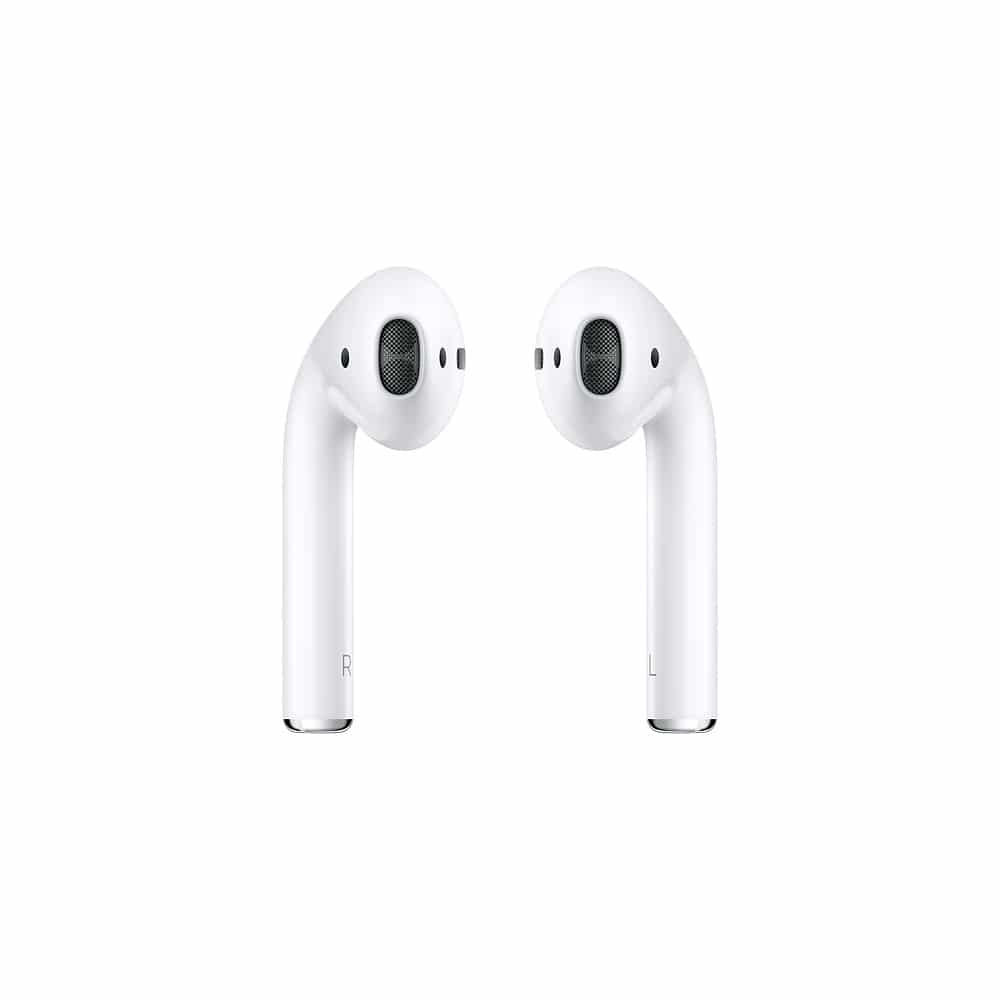
 

Apple Wireless AirPods

Apple AirPods

Apple is a brand name that throughout the years, with their high-quality products and overall company impression has turned many consumers into diehards for any product they offer. With their AirPods, it’s easy to understand why. While Apple is notorious for making products that only work with those that are produced by Apple, the AirPods break that trend with limited functionality with Android-based products.

Providing a strong Bluetooth connection in combination with the excellent battery life, which is up to five hours on a single charge, Apple has put their spin on wireless earphones that are better than expected but aren’t without issues. The design can keep them from fitting correctly in someone’s ears plus, despite the high-end price, the sound quality can be less than what some audiophiles may be looking for.

Learn More

$159
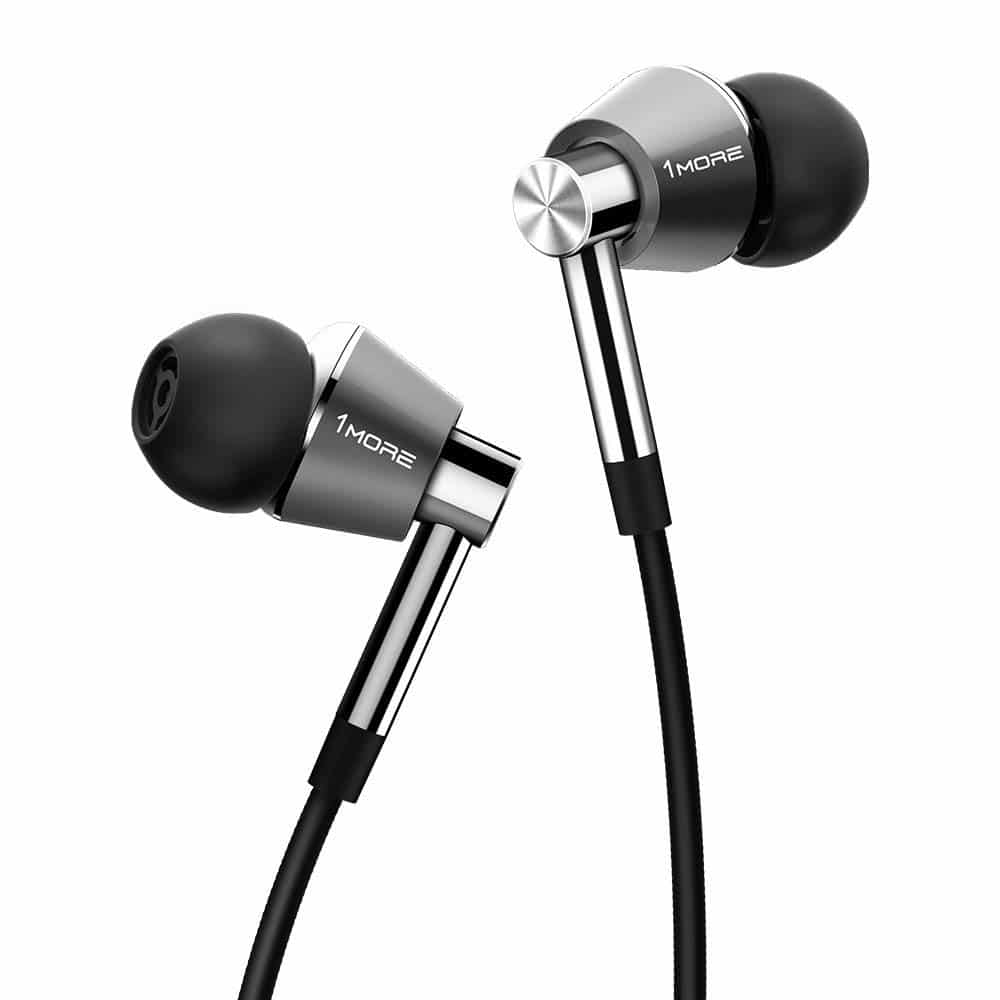
 

1More Triple Driver In-Ear Headphone

Triple Driver In-Ear earphones

A major misconception when it comes to earphones is that in order to get excellent sound quality, you have to spend a boatload of money. This isn’t the case when it comes to the Triple Driver In-Ear Headphones by 1More as their relatively affordable price can provide you with lush sound quality. The sleek and modern design is enhanced by the aluminium construction and rose gold color which is created by the combination of the color of gold mixed with copper. Angled design helps them fit into your ear nicely.

While the value of the Triple Driver Headphones is unmatched, like many other wired earphones, they do have some issues. As with many wired earphones, the rubber cable can get caught on itself and the plastic remote attached to the cord to control playback and volume can feel a bit cheap but for such high sound quality at an affordable price, it’s hard to not look past these minimal issues.

Learn More

$74


RHA MA 390 Wireless

RHA MA390

While it’s becoming increasingly apparent that the future of earphones is a wireless one, however, that can present problems along with the convenience, such as battery life, wireless reliability, and the issue of not losing them which can be pretty easy. The design of the MA390 Wireless earphones, known as neck buds, can be a better alternative to wireless earphones, can provide a longer battery life and in the case of these earphones, a better quality and balanced sound that while they have a neutral tonality, the level of bass that the earphones put out leaves something to be desired.

The wireless connection of the earphones is excellent and doesn’t experience the dropouts that can be common among other wireless earphones. We never ran into an issue moving around the house and having the music cut out on us. The battery life gives you about seven hours of listening time which is much better than some other options on the market. While the overall design can take some getting used to and is definitely not for everyone, you can’t go wrong with the MA390 Wireless earphones from RHA.

Learn More

$70
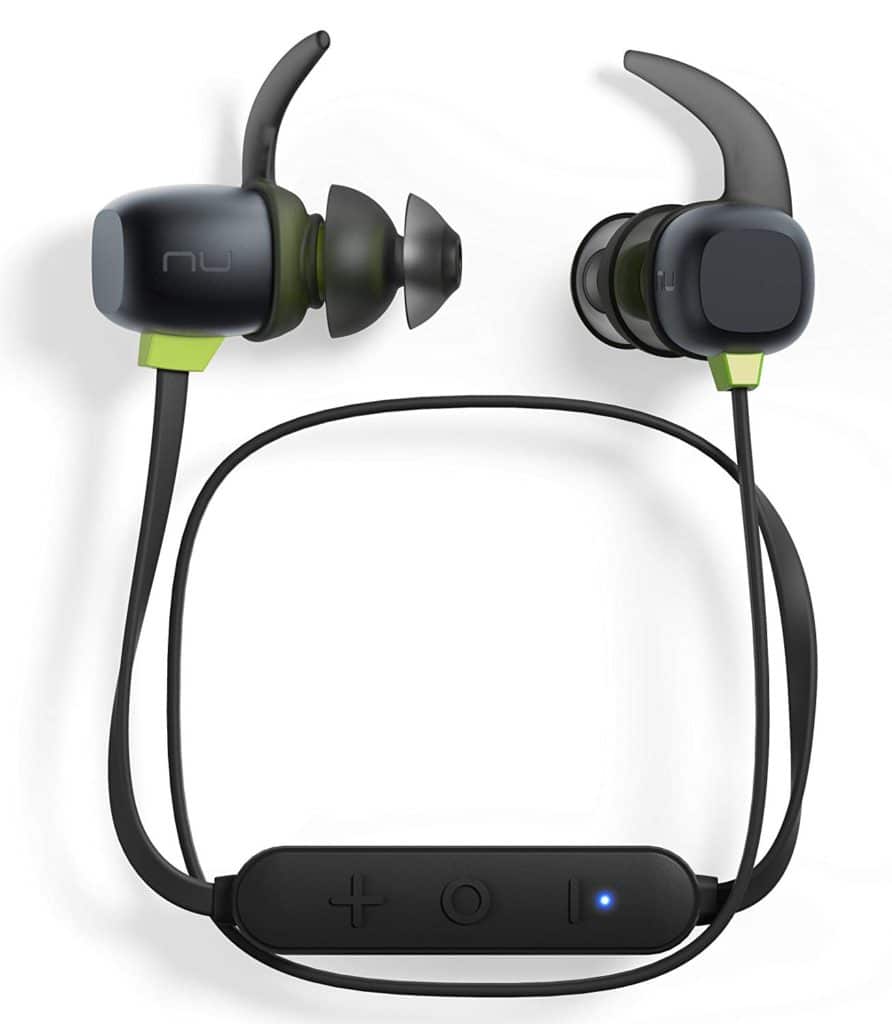
 

Optoma NuForce BE Sport4

NuForce BE Sport4

With many earphones, finding ones that fit right can be a struggle. However, with the NuForce BE Sport4 earphones from Optoma with customized ear tips and are good to use in just about every situation. Made with a glossy black metal design, and lime green accent, the Sport4 earphones give off a look more commonly found on high-end earphones. The included fittings allow for a high degree of personalization, giving you the ability to tailor how the earphones fit in your ears.

At an incredibly lightweight 15 grams, they are light enough to feel like they aren’t there at all but at the same time, they are substantial enough in order to feel sturdy. A unique feature of the BE Sport4 is the magnetic ends on each earbud helping reduce the chances that you might lose them. A soft carry pouch helps keep them safe and secure when not in use and charges easily using a mini USB cable makes charging super easy.

Learn More

$67


Optoma NuForce BE Free5

BE Free5

Getting the best sound quality from your earphones shouldn’t cost you more than your monthly utility bill. That’s why the NuForce BE Free5 from Optoma receives so much praise for not only their design but their affordable cost. A wireless earbud, the BE Free5 earbuds are one of the least expensive ways to get a truly wireless experience. While reminiscent of other offerings from Optoma, the Free5’s matte finish and textured plastic give them a more grown-up feel. The inclusion of an LED in each earbud to let you know whether they’re connected, pairing, or low on power is a nice feature

The fit of the Free5 is very good in comparison to other in-ear earphones on the market. Once they are in, they can be very comfortable in your ear, without having to adjust them constantly as with some other earphones. The sound quality is among the top options at its price point, beating many of its competitors and can be very efficient at drowning out ambient noise when listening to music. The areas where the Free5 falters, however, is in the connection strength. Unfortunately, the signal can be dropped from time to time and can be very frustrating. However, with the sound quality and the undeniable value for a premium earphone that is truly wireless, the NuForce BE Free5 from Optoma is worth a look.

Learn More

$79
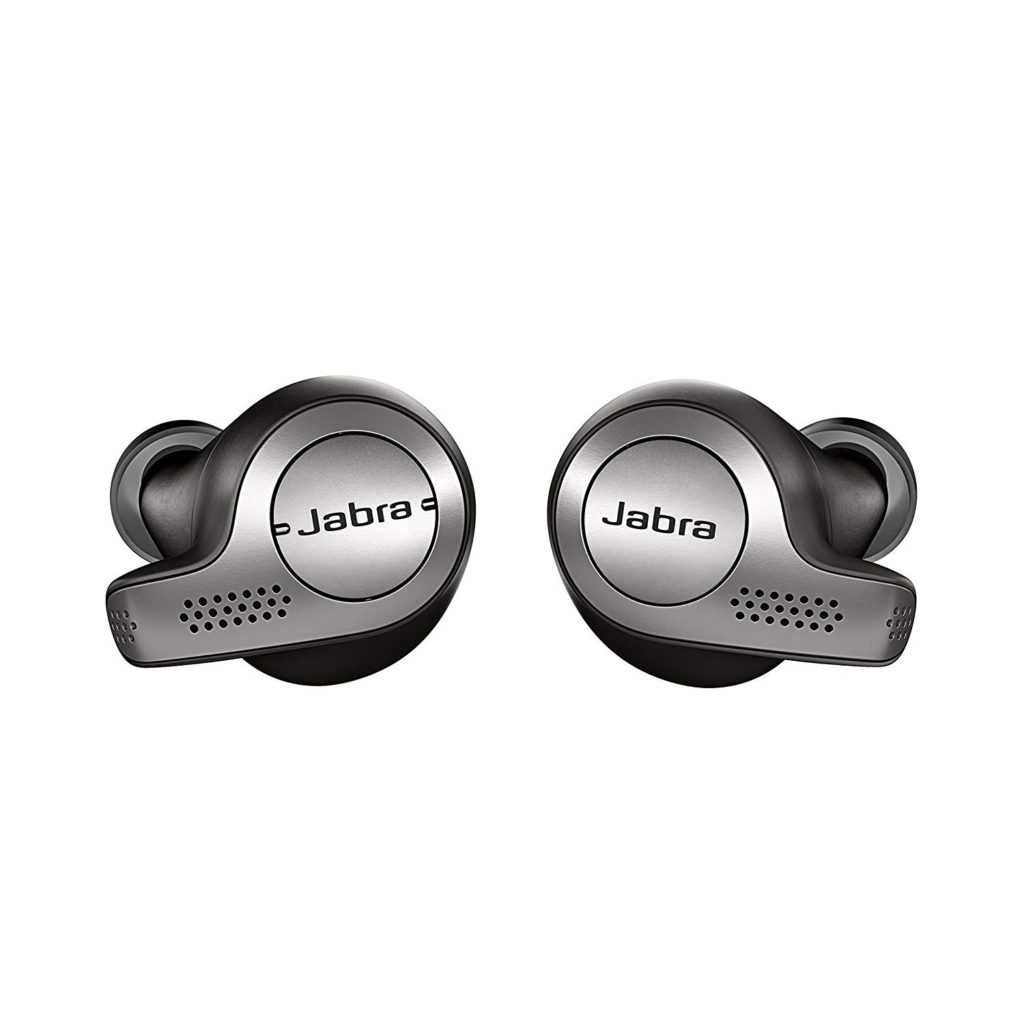
 

Jabra Elite 65t True Wireless

Jabra Elite

In the world of truly wireless earphones, the list typically starts with the AirPods from Apple and the next option on that list is the Elite 65t True Wireless earphones from Jabra. If it’s not, then it definitely should be. While Jabra probably won’t win any awards for the design of the 65t earphones, the overall appearance has a subtle and mature look and have the feeling of a premium product even though they are mainly made from plastic. On the earbuds, perforations allow various microphones to pick up your voice while making calls but also to mix in outside sounds, which can be adjusted using Jabra’s app, available for both iOS and Android. The carrying case can be a bit cumbersome, itself also made from plastic while you make sure that the earbuds are positioned correctly to ensure the case closes the right way to keep them from falling out.

When removed from their carrying case, the Elite 65t earphones turn on automatically, which is a nice feature that not many other wireless earphones have; and also turn off when putting back in the case. The performance of the wireless connection is right up there with some of the best options on the market and rarely has issues. The sound quality is excellent as well, giving you a crisp listening experience no matter the song or podcast episode. The battery life is 5 hours according to the manufacturer’s information. However, unless you’re blasting music at its highest level all the time, you should be able to get more than that. While the price point might keep some from trying the Elite 65t True Wireless earphones from Jabra, if you are able to, we cannot recommend them enough. You will be very satisfied.

Learn More

$125


Sennheiser Momentum In-Ear

Seinhesier Momentum

If you visit your local shopping center and head to the electronics section, you can easily find rows and rows of cheaply priced or even cheaply made earphones that many of us settle for because we either don’t know any better or can’t afford a better option. The Momentum In-Ear earphones from Sennheiser offer a high-quality option with excellent sound quality for much less than you might think. Designed with a sporty look combining black and red earphones with a red cord will make it look right at home whether being used at work or during a workout at the gym. Wire tangling is an ever common issue with wired earphones, but the flat wires of the Momentum are designed to keep them less likely to get tangled.

If you’re used to using cheap sets of earphones to listen to music, then the sound quality that the Momentum offers is going to sound incredible. This isn’t to say that they cannot provide quality sound, booming bass and enjoyable experience which they most certainly do, even though the mids don’t provide much enjoyment, it is still a huge step up from the cheaper option. If you’re looking for an upgrade that while affordable, keeps you out of the bargain bin, you can’t go wrong with the Momentum In-Ear earphones from Sennheiser.

Learn More

$100


1More Quad Driver In-Ear Headphones

Triple Driver In-Ear earphones

With any product that you can buy, there are many different options out there. Including those that perform well or those that are designed to give them a high-end look. In the case of the Quad Driver In-Ear Headphones from 1More, it’s a combination of both with a stylish look and balanced sound quality that puts them in their own little niche. With aluminum construction, the Quad Driver give the appearance of being crafted from a single piece of metal, which will appeal to those who want an option that stands out visually. While the tips that the earphones come with can be a bit large, 1More provides more than enough different tips so you can try out different options to find the best fit.

Wonderfully balanced, the Quad Driver can provide highs that have a nice extension although they lack the sparkle that can come from other earphones. The quality performance of the earphones soundstage and voicing puts them ahead of others out there on the market. While many will see the design and immediately flock towards them for that reason, beneath the surface, the Quad Driver In-Ear Headphones from 1More can be that perfect combination of performance and design.

Learn More

$74
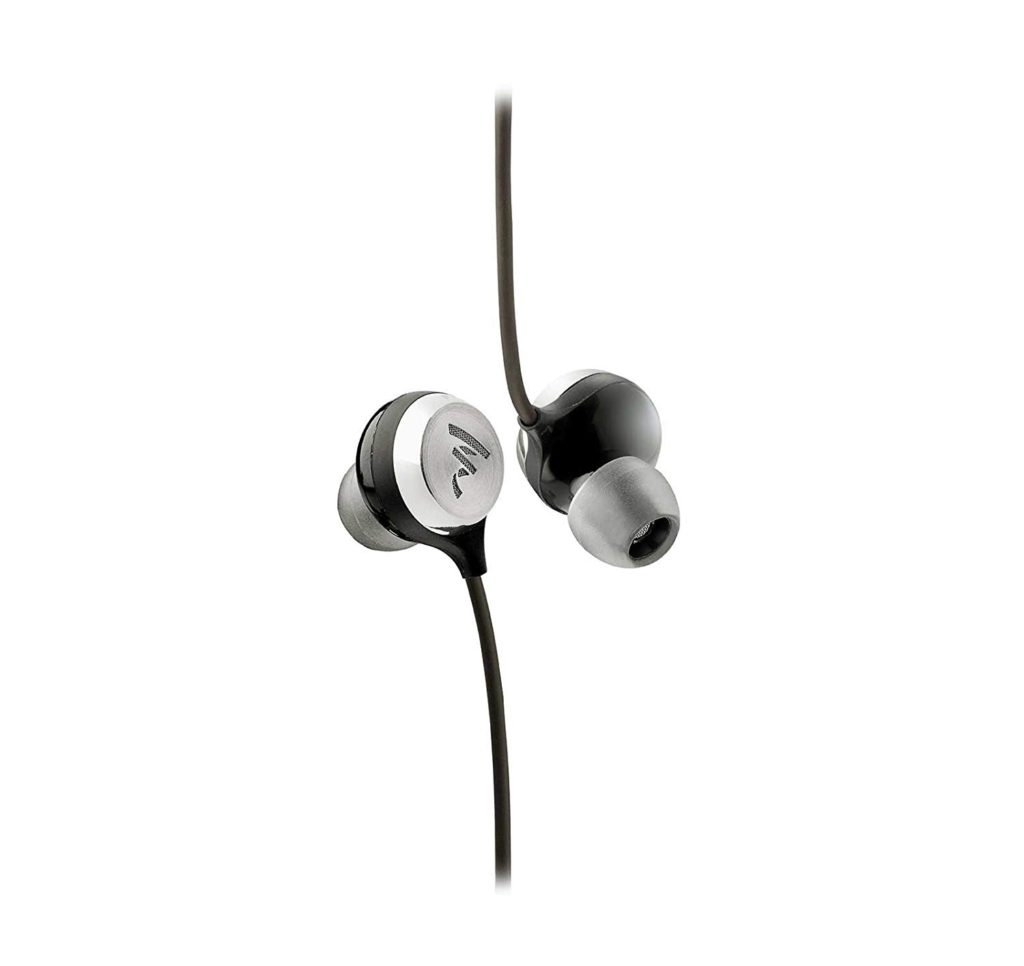
 

Focal Sphear S

Sphear S

Focal, a French company who is better known for creating loudspeakers that are of the highest quality, surprised consumers with their first foray into the earphones market. With the Focal Sphear S, while they may not topple any of the big boys just yet, their first entry into the in-ear niche is certainly getting attention with housings that while they are made from plastic, have a steel grille that gives them a more expensive feel. An understated design helps to keep the focus off how they look and push it more towards the performance of the earphones, which shines.

The mid-forward performance of the earphones offers a nice amount of energy in the highs for any number of instruments and won’t detract from the highs or the base either. While the bass could use more impact when it comes to songs in the electronic and rap genres, it has a good amount of extension, though can pale in comparison to some higher-priced options. Compared to those other options, the sound quality of the Focal Sphear presents itself with a rich quality of sound even though they only offer an average amount of noise isolation. Overall, the Sphear from Focal is a quality offering from a brand just getting started in the earphones area.

Learn More

$65

The Best Earbuds in 2019

Here is a summary of the best earbuds, perfect for designers, freelancers, creatives and music lovers in general.

  1. Bose SoundSport Free $199
  2. Apple AirPods $159
  3. 1More Triple Driver In-Ear Headphone $74
  4. RHA MA 390 Wireless $70
  5. Optoma NuForce BE Sport4 $67
  6. Optoma NuForce BE Free5 $79
  7. Jabra Elite 65t True Wireless $125
  8. Sennheiser Momentum In-Ear $100
  9. 1More Quad Driver In-Ear Headphones $74
  10. Focal Sphear S $65

What earphones do you use?

Tuesday, 1 January 2019

Top 100 Courses to Take on Udemy in 2019

Looking to learn a new skill in 2019?

Here are the best Udemy courses to take in 2019, based on official Udemy statistics (popularity & ratings) in 2018.

There are 80,000 courses in more than 50 languages and below they’ve been sorted into the categories of design, development, IT,  personal development and photography.

*New Year’s Sale: Get Udemy courses for as low as $9.99 now! 

New year sale on Udemy

» Browse All Online Courses

Sale ends January 10th.


Top Design Courses

3D & Animation

  1. Complete Blender Creator: Learn 3D Modelling for Beginners
  2. After Effects CC 2019: Complete Course from Novice to Expert
  3. Maya for Beginners: Complete Guide to 3D Animation in Maya

Design Tools

  1. Drawing and Painting on the iPad with Procreate
  2. The Complete Sketch 5 Course – Design Apps & Websites
  3. Photoshop CC 2019 MasterClass
  4. Premiere Pro CC: Fast Track to Video Editing in Premiere Pro
  5. After Effects CC Masterclass
  6. Illustrator CC 2019 MasterClass

Graphic Design

  1. The Ultimate Drawing Course – Beginner to Advanced
  2. Ultimate Photoshop Training: From Beginner to Pro
  3. Graphic Design Bootcamp: Part 1
  4. Anatomy for Figure Drawing: Mastering the Human Figure
  5. Adobe InDesign CC – Essentials Training Course
  6. The Complete Graphic Design Theory for Beginners Course
  7. How to Draw and Sketch for Absolute Beginners

User Experience (UX)

  1. Web UI UX Design using Adobe XD – User Experience Design
  2. User Experience (UX): The Ultimate Guide to Usability and UX
  3. The Complete App Design Course – UX, UI and Design Thinking

Web Design

  1. UX & Web Design Master Course: Strategy, Design, Development
  2. Learn Photoshop, Web Design & Profitable Freelancing
  3. WordPress for Beginners – Master WordPress Quickly
  4. The Complete Sketch 5 Course – Design Apps & Websites 2018
  5. DESIGN RULES: Principles + Practices for Great UI Design

Other

  1. Character Art School: Complete Character Drawing Course
  2. The Digital Painting MEGA Course: Beginner to Advanced
  3. Become a Game Designer the Complete Series Coding to Design


Top Development Courses

Web Development

  1. The Complete 2019 Web Development Bootcamp
  2. The Complete JavaScript Course 2018: Build Real Projects!
  3. Angular 7 (formerly Angular 2) – The Complete Guide
  4. Modern React with Redux
  5. Build Responsive Real World Websites with HTML5 and CSS3
  6. Advanced CSS and Sass: Flexbox, Grid, Animations and More!
  7. The Complete WordPress Website Business Course
  8. Angular & NodeJS – The MEAN Stack Guide

Programming Languages

  1. Complete Python Bootcamp: Go from zero to hero in Python 3
  2. Java Programming Masterclass for Software Developers
  3. React 16.6 – The Complete Guide (incl. React Router & Redux)
  4. NodeJS – The Complete Guide (incl. MVC, REST APIs, GraphQL)
  5. Beginning C++ Programming – From Beginner to Beyond

Game Development

  1. Complete C# Unity Developer 2D: Learn to Code Making Games
  2. Unreal Engine C++ Developer: Learn C++ and Make Video Games

Mobile Apps

  1. iOS 12 & Swift – The Complete iOS App Development Bootcamp
  2. The Complete Android N Developer Course
  3. Learn Flutter & Dart to Build iOS & Android Apps
  4. The Complete React Native and Redux Course


Top IT & Software Courses

  1. Learn Ethical Hacking From Scratch
  2. AWS Certified Solutions Architect – Associate 2018
  3. The Complete Cyber Security Course : Hackers Exposed!
  4. AWS Certified Developer – Associate 2018


Top Personal Development Courses

  1. Become a SuperLearner: Learn Speed Reading & Boost Memory
  2. Life Coaching Certificate Course (Achology Certified)
  3. Neuroscience for parents: How to raise amazing kids
  4. Investing In Stocks The Complete Course! (11 Hour)
  5. 2018 Complete Public Speaking Masterclass For Every Occasion
  6. The Complete Shopify Dropshipping Masterclass


Top Photography & Video Courses

  1. Photography Masterclass: A Complete Guide to Photography
  2. Premiere Pro CC for Beginners: Video Editing in Premiere
  3. Adobe Lightroom Classic CC & CC: Photo Editing Masterclass
  4. Night Photography: You Can Shoot Stunning Night Photos
  5. The Complete Video Production Bootcamp
  6. iPhone Photography | Take Professional Photos On Your iPhone
  7. The Ultimate Photography Course For Beginners


» Browse All Online Courses

What courses are you going to take in 2019?